Delete Mesh Modifier
Delete Mesh provides parametric deletion based on the current sub-object selection level in the stack. The possible choices are faces, vertices, edges, and objects. Apply the Delete Mesh modifier to delete the geometry selected at that sub-object level.
 Modify panel > Make a sub-object selection. > Modifier List > DeleteMesh
- Default menu: Modify panel > Make a sub-object selection. > Modifiers menu > Mesh Editing > Delete Mesh
- Alt menu: Modify panel > Make a sub-object selection. > Modifiers menu > Geometry (Convert to Mesh) > Delete Mesh
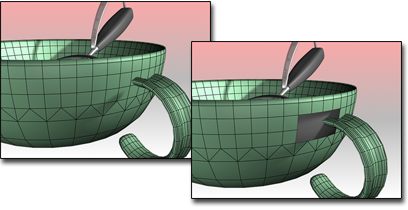
Delete Mesh used to remove the faces where the handle joins the cup.
For example, you can apply a Mesh Select modifier, select a row of faces in a cylinder, and then apply a Delete Mesh modifier to delete those faces. To undo the deletion, you can simply remove the Delete Mesh modifier.
Procedure
Example: Delete a row of faces in a cylinder:
Create a cylinder.
Apply a Mesh Select modifier and select a row of faces in the cylinder.
Apply the Delete Mesh modifier to delete those faces.
To undo the deletion, click
 to remove the Delete Mesh modifier.
Interface
This modifier has no parameters.