AutoCAD Mechanical toolset allows you to create edge symbols that comply with the active drafting standard.
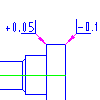
The list at the end of this topic shows all drafting standards that are supported.
An edge symbol can exist as a free-standing object or be attached to an object in the drawing. When a symbol is attached, it moves with the object whenever the object is repositioned. If a symbol is already attached and you want to attach it to different object, you must detach it first.
Edge symbols support the following:
- Ability to provide edge details, such as broken, passing, burr, sharp-edged, undercut, or recessed edges.
- Ability to provide edge types without a defined size.
- Ability to show standard revision label.
- Ability to define the symbol location precisely using object snaps or entering coordinate values.
- Ability to display the all-around symbol on the leader.
You can set an edge symbol as a majority symbol, which acts as a collective indicator for all unspecified edges in the drawing. When the majority symbol is configured to display the full list, it reports the state of all other edge symbols. If the majority symbol is placed inside a drawing border created with AMTITLE command, it reports the state of all edge symbols within that drawing border. If the majority symbol is placed outside the drawing border, it reports the state of all majority symbols in the drawing. When configured to display a simplified list, the majority symbol shows only the basic symbol and does not report the state of any other edge symbols.
Supported Drafting Standards
- DIN ISO 13715 (2000)
- DIN 6784 (1982)
- GB/T 19096 (2003)
- JIS B 0051 (2004)
- ISO 13715 (2017)
- ISO 13715 (2000)
- ISO/DIS 13715 (1984)