The Calculate ReFH/ReFh2 model parameters dialog is used to view and edit Subcatchment parameters associated with the either the ReFH or ReFH2 runoff model.
This dialog can be displayed by selecting the
 button adjacent to the ReFH/ReFH2 Descriptors field on a subcatchment's
Property Sheet.
button adjacent to the ReFH/ReFH2 Descriptors field on a subcatchment's
Property Sheet.
Or alternatively, for calculating ReFH parameters for multiple subcatchments, this dialog can also be displayed by:
- Opening a GeoPlan view or network object Grid Window
- Making a selection of the applicable subcatchments
- Selecting the Calculate ReFH parameters option from the Model menu
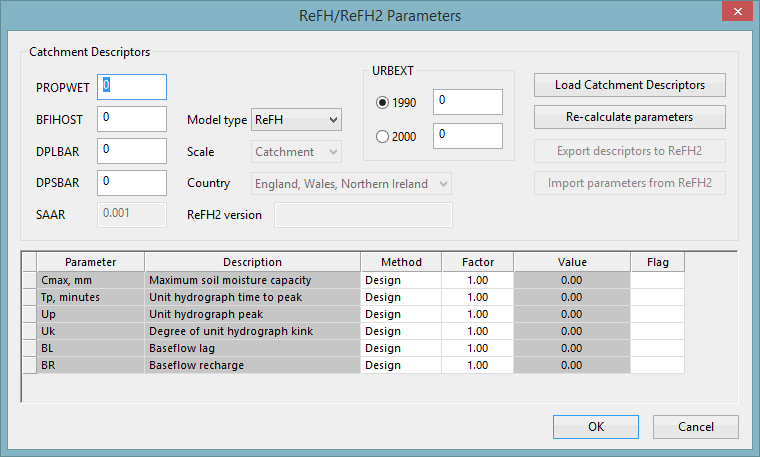
Subcatchment ReFH/ReFH2 parameters can be entered manually or calculated from specified catchment descriptors. Click OK to accept the values currently displayed in the dialog. The ReFH/ReFH2 parameter fields for all currently selected subcatchments will be updated with the contents of the parameter Value field in the bottom half of the dialog.
Catchment Descriptors
Catchment descriptors can either be entered manually, loaded from the FEH CD, or downloaded from the FEH Web Service.
These descriptors will be used to calculate those ReFH/ReFH2 parameters listed in the bottom half of the dialog that have Method set to Design.
|
Catchment Descriptors |
Description |
|---|---|
| PROPWET | Proportion of time the catchment soil moisture deficit (SMD) was below 6mm during the period 1961-1990. |
| BFIHOST | Baseflow Index. |
| DPLBAR | Mean drainage path length. |
| DPSBAR | Mean drainage path slope. |
| URBEXT |
Only enabled when Model type field is set to ReFH. Extent of urban and suburban land cover. Options are:
|
| SAAR | Only enabled when Model type field is set to ReFH2
Standard -period average annual rainfall (1961-1990) |
| Model type |
The version of model used for the calculation:
Note: If the ReFH/ReFh2 Parameters dialog was displayed by selecting the Calculate ReFH parameters option from the Model menu (described above), then the Model Type field is automatically set to ReFH.
|
| Scale | Only enabled when Model type field is set to ReFH2.
The scale can be set to:
|
| Country | Only enabled when Model type field is set to ReFH2.
The county can be set to:
|
| ReFH2 |
The version number of the ReFH2 software currently being run on the PC. A read-only field which is displayed when Model type field is set to ReFH2 |
Click:
- Load Catchment Descriptors to display a Windows File Open dialog which can be used to select the relevant FEH Export files (XML or CSV) to be loaded to InfoWorks ICM.
- Re-calculate parameters to re-calculate the subcatchment ReFH/ReFH2 parameters. If the Model type field is set to ReFH2 then the ReFH2 software from Wallingford HydroSolutions (WHS) must be installed, with a current licence, on the same PC as InfoWorks ICM. This is not a requirement when using the ReFH model.
- Export Descriptors to ReFH2 to export the current descriptors in an XML file suitable for use in the ReFH2 software.
- Import parameters from ReFH2 to import the parameters an ReFH2 RXML file.
Calculation of ReFH Parameters
For each parameter with the Method field set to Design, InfoWorks ICM will calculate the parameter value using the Catchment Descriptors specified in the top part of the dialog.
The Value field will be set to the calculated value multiplied by the Factor specified for the parameter.
| Parameter |
Calculated Value (R&D Technical Report FD1913/TR) |
|---|---|
| Cmax | 596.7 BFIHOST0.95 PROPWET-0.24 |
| Tp | 1.563 PROPWET-1.09 DPLBAR0.60 (1+URBEXT)-3.34 DPSBAR-0.25 |
| Up | 0.65 |
| Uk | 0.8 |
| BL | 25.47 BFIHOST0.47 DPLBAR0.21 PROPWET-0.53 (1+URBEXT)-3.01 |
| BR | 3.751 BFIHOST1.08 PROPWET0.36 |
For each parameter with the Method field set to User, the value of the ReFH parameter is manually entered in the Value field of the parameter.