Each sheet metal feature collection uses the pattern described in Sheet Metal API Overview: create an input, set the same options you would set in the command dialog, then call add.
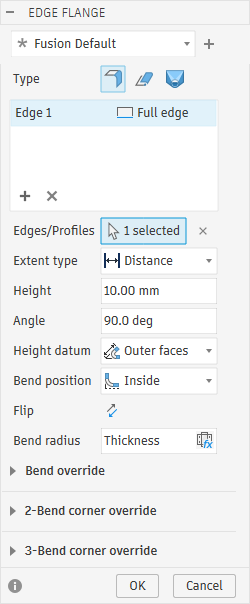
The input object is analogous to the command dialog. For example, the Edge Flange dialog below shows the settings that EdgeFlangeInput exposes:
Edges/Profiles – the edges passed to createEdgeFlangeInput. The edge list above Edges/Profiles, with Full edge for each edge, corresponds to edgeDefinitions.
Extent type and Height – the distance passed to createEdgeFlangeInput, or setToObjectExtent to extend to an object.
Angle – angle.
Height datum – heightDatumType.
Bend position – bendPositionType.
Bend override – bendRadiusOverride and bendReliefOverride.
2-Bend corner override – twoBendCornerOverride.
3-Bend corner override – threeBendCornerOverride.
flangeFeatures covers three flange types, each with its own input: EdgeFlangeInput, BaseFlangeInput, and ContourFlangeInput.
Edge flange – adds material along one or more edges with distance and bend angle.
Base flange – starts a new sheet metal body from one or more profiles.
Contour flange – extrudes one or more open profiles a specified distance.
import adsk.core, adsk.fusion

app = adsk.core.Application.get()
design = adsk.fusion.Design.cast(app.activeProduct)
rootComp = design.rootComponent
flangeFeatures = rootComp.features.flangeFeatures

flangeEdges = [edge1, edge2]

edgeFlangeInput = flangeFeatures.createEdgeFlangeInput(
    flangeEdges,
    adsk.core.ValueInput.createByString('10 mm'))
edgeFlangeInput.bendPositionType = adsk.fusion.BendPositionTypes.InsideBendPositionType
edgeFlangeInput.angle = adsk.core.ValueInput.createByString('90 deg')
flangeFeature = flangeFeatures.add(edgeFlangeInput)
The distance argument is the flange height (the Height field), shared by every edge in the input. It is not a per-edge value.
Per-edge width (how much of each edge's length the flange covers) is controlled separately:
Edges passed directly to createEdgeFlangeInput are full-length and cannot be changed afterward.
For custom widths, pass an empty edge list and add edges through edgeFlangeInput.edgeDefinitions:
edgeFlangeInput = flangeFeatures.createEdgeFlangeInput(
    [], adsk.core.ValueInput.createByString('10 mm'))
edgeFlangeInput.edgeDefinitions.addFullLengthEdge(edge2)
edgeFlangeInput.edgeDefinitions.addSymmetricEdge(
    edge1, adsk.core.ValueInput.createByString('5 mm'))
The edgeDefinitions methods are:
addFullLengthEdge – full edge length.
addSymmetricEdge – width centered on the edge midpoint (total width is twice the value given).
addTwoSidedEdge – independent widths from the midpoint.
addTwoOffsetsEdge – insets from each end of the edge.
Other edge flange input properties:
heightDatumType (FlangeHeightDatumTypes) – where the distance is measured from: the outer faces (OuterFacesFlangeHeightDatumType, the default), the inner faces (InnerFacesFlangeHeightDatumType), or tangent to the bend (TangentToBendFlangeHeightDatumType).
isMiteredCorners – miter where adjacent edge flanges meet.
setToObjectExtent(toEntity, offset) – extend to another face or plane instead of a fixed distance.
Set activeSheetMetalRule on the component before creating a base, contour, or lofted flange; the rule sets the new body's thickness:
rootComp.activeSheetMetalRule = design.librarySheetMetalRules.itemByName('Steel (mm)')
profile = sketch.profiles.item(0)
baseFlangeInput = flangeFeatures.createBaseFlangeInput([profile])
flangeFeature = flangeFeatures.add(baseFlangeInput)
Note: When you create a base, contour, or lofted flange in a nested component, activate that component first (Occurrence.activate()). Otherwise the new body is created in the root component.
Base and contour inputs expose operation (FeatureOperations). Because they create the initial sheet metal body from a profile, only NewBodyFeatureOperation (the default) and NewComponentFeatureOperation are valid.
The orientation property (FlangeOrientations) controls which side of the profile plane receives material: SideOneFlangeOrientation, SideTwoFlangeOrientation, or CenteredFlangeOrientation.
A contour flange takes open profiles, which you create from sketch curves with Component.createOpenProfile. The following example creates a symmetric contour flange. The setSymmetricDirection method replaces the distance passed to createContourFlangeInput and applies its own distance to each side of the profile plane, so '10 mm' gives a 20 mm flange:
# line1 is the first sketch line of an open sketch shape, such as an L.
openProfile = rootComp.createOpenProfile(line1, True)
contourFlangeInput = flangeFeatures.createContourFlangeInput(
    [openProfile], adsk.core.ValueInput.createByString('10 mm'))
contourFlangeInput.setSymmetricDirection(adsk.core.ValueInput.createByString('10 mm'))
flangeFeature = flangeFeatures.add(contourFlangeInput)
Lofted flanges use loftedFlangeFeatures, not flangeFeatures. They loft between exactly two profiles, which must both be open or both be closed and must lie on separate planes.
The formingType property (LoftedFlangeFormingTypes) controls how the flange is formed. The default, BrakeFormLoftedFlangeFormingType, approximates the loft with flat facets joined by straight bends, as a press brake would. DieFormLoftedFlangeFormingType produces a smooth surface instead. Lofted flange inputs also have an orientation property, as base and contour flanges do.
With brake forming, you must set the facet control before calling add, using one of:
setFacetControlByChordTolerance – the maximum distance between the true surface and the facets.
setFacetControlByFacetAngle – the maximum angle between adjacent facets.
setFacetControlByFacetDistance – the maximum length of a facet edge.
setFacetControlByFacetNumber – a fixed number of facets, from 1 to 1000.
For open profiles, create each one with Component.createOpenProfile, as for a contour flange.
loftedFlangeFeatures = rootComp.features.loftedFlangeFeatures
# startCurve and endCurve are sketch curves on two separate planes.
startProfile = rootComp.createOpenProfile(startCurve, True)
endProfile = rootComp.createOpenProfile(endCurve, True)
profiles = [startProfile, endProfile]
loftedFlangeInput = loftedFlangeFeatures.createInput(profiles)
loftedFlangeInput.setFacetControlByFacetNumber(adsk.core.ValueInput.createByReal(10))
loftedFlangeFeature = loftedFlangeFeatures.add(loftedFlangeInput)
hemFeatures fold material back at an edge. Configure HemFeatureInput with the setter for the hem style (flat, open, rolled, rope, teardrop, or double), such as setFlatHem or setRolledHem. Every hem setter takes a bend position, which must be StartEdgeBendPositionType or TangentToSideBendPositionType. The other BendPositionTypes values, such as InsideBendPositionType, apply to edge flanges and are not valid for hems.
hemFeatures = rootComp.features.hemFeatures
hemInput = hemFeatures.createHemFeatureInput()

# The third argument, isFlipped, reverses the fold direction when True. False keeps the default direction.
hemInput.setFlatHem(
    hemEdge,
    adsk.core.ValueInput.createByString('5 mm'),
    False,
    adsk.fusion.BendPositionTypes.StartEdgeBendPositionType)
hemFeature = hemFeatures.add(hemInput)
ripFeatures cut a gap so a closed shape can unfold. Configure RipFeatureInput with:
setByFace – removes an entire face.
setAlongEdge – creates a gap along an edge. The edge must lie between two smoothly connected faces on the same side of the sheet, such as the line where a flat face runs into a bend. A sharp corner edge or an outer boundary edge is rejected.
setBetweenPoints(pointOne, pointTwo, gapDistance, offsetOne, offsetTwo) – creates a gap between two points.
ripFeatures = rootComp.features.ripFeatures
ripInput = ripFeatures.createRipFeatureInput()
ripInput.setAlongEdge(ripEdge, adsk.core.ValueInput.createByString('1 mm'))
ripFeature = ripFeatures.add(ripInput)
cornerClosureFeatures connect and miter two planar flanges at a corner. CornerClosureFeatureInput is created from the dominant edge and the submissive edge of the corner closure: one linear edge from each of two flanges that meet at the corner. When you select edges in the Corner Closure command, the first edge is the dominant edge and the second is the submissive edge.
When the input is created, the alignment type is a symmetric gap; set the gap distance with gap. To set the alignment type to an overlap, call setToOverlapAlignmentType(overlap, isFlipped). The overlap argument is the overlap percentage, a unitless value from 0 (no overlap) to 1 (100% overlap). The isFlipped argument defines whether the dominant edge goes over the submissive edge or vice versa.
The isWidthExtentAligned property controls whether the corner closure extends along the flange edges, aligned with the edge direction (True, the default), or perpendicular to the flange edges (False). The bendTransition property (BendTransitionTypes) can be smooth (SmoothCornerBendTransitionType, the default), straight line (StraightLineCornerBendTransitionType), or trim to bend (TrimToBendCornerBendTransitionType).
Note: Overlap alignment is not available in Fusion for Personal Use. In Fusion for Personal Use, calling setToOverlapAlignmentType or editing an existing corner closure that uses an overlap throws an exception.
cornerClosureFeatures = rootComp.features.cornerClosureFeatures
cornerInput = cornerClosureFeatures.createInput(dominantEdge, submissiveEdge)
cornerInput.gap = adsk.core.ValueInput.createByString('1 mm')
cornerClosureFeature = cornerClosureFeatures.add(cornerInput)
The read-only closureType property (CornerClosureTypes) reports whether the corner is a two-bend or three-bend corner, which determines which corner override type applies (see the table in Sheet Metal Rule Overrides).
Use joinByBendFeatures to join two sheet metal bodies with a bend, using one edge from each of the two bodies.
joinByBendFeatures = rootComp.features.joinByBendFeatures
joinInput = joinByBendFeatures.createInput(edge1, edge2)
joinByBendFeature = joinByBendFeatures.add(joinInput)
Join by bend features support bendRadiusOverride and bendReliefOverride, but not corner overrides.
Note: Join by bend is not available in Fusion for Personal Use. Creating or editing a join by bend feature in Fusion for Personal Use throws an exception.
A feature can override part of the active rule locally. The override objects are BendRadiusOverride, BendReliefOverride, TwoBendCornerOverride, and ThreeBendCornerOverride. Each feature exposes only the overrides that apply to it:
| Feature | bendRadiusOverride | bendReliefOverride | twoBendCornerOverride / threeBendCornerOverride |
|---|---|---|---|
| Base flange | no | no | no |
| Contour flange | yes | no | no |
| Edge flange | yes | yes | yes (whichever matches the corner) |
| Hem | yes, except rolled, rope, and teardrop hems | open and double hems only | no |
| Corner closure | no | no | yes (matches closureType) |
| Join by bend | yes | yes | no |
On the input object while creating the feature:
edgeFlangeInput = flangeFeatures.createEdgeFlangeInput(
    [edge1, edge2], adsk.core.ValueInput.createByString('10 mm'))
edgeFlangeInput.bendRadiusOverride.setOverride(adsk.core.ValueInput.createByString('3 mm'))
flangeFeature = flangeFeatures.add(edgeFlangeInput)
On an existing feature, roll the timeline marker before that feature, edit it, then move the marker back to the end:
# flangeFeature is an existing edge flange, such as the one created above.
flangeFeature.timelineObject.rollTo(True)
flangeFeature.bendRadiusOverride.setOverride(adsk.core.ValueInput.createByString('4 mm'))
design.timeline.moveToEnd()
Other override types use the same pattern with different setOverride arguments. Every override object supports isOverridden and clearOverride().
Unfold and Refold work as a pair:
UnfoldFeature temporarily unfolds bends around a stationary face so you can add sketches, holes, or other features on the flat shape.
A refold feature refolds the bends that an unfold feature flattened. Create its RefoldFeatureInput from that unfold feature.
Besides the stationary face, the unfold input needs to know which bends to unfold. Either set isUnfoldAllBends to True, or set bendFaces to the inner or outer cylindrical face of each bend to unfold. If you do neither, add fails.
unfoldFeatures = rootComp.features.unfoldFeatures
refoldFeatures = rootComp.features.refoldFeatures

stationaryFace = body.faces.item(0)
unfoldInput = unfoldFeatures.createInput(stationaryFace)
unfoldInput.isUnfoldAllBends = True
unfoldFeature = unfoldFeatures.add(unfoldInput)

# Add sketch, hole, or other features on the flat body here.

refoldInput = refoldFeatures.createInput(unfoldFeature)
refoldFeature = refoldFeatures.add(refoldInput)
FoldFeatures is separate: you add explicit bend lines on the input instead of unfolding existing flange bends.
sheetMetalFilletFeatures and sheetMetalChamferFeatures are separate from the general filletFeatures and chamferFeatures collections. They operate only on thickness-direction edges (perpendicular to the sheet metal front and back faces).
Edges are grouped into edge sets, and each set has one radius or distance.
sheetMetalFilletFeatures = rootComp.features.sheetMetalFilletFeatures
filletInput = sheetMetalFilletFeatures.createInput()
filletInput.edgeSetInputs.add(filletEdges, adsk.core.ValueInput.createByString('1 mm'))
filletFeature = sheetMetalFilletFeatures.add(filletInput)
Chamfers use the same pattern, with a distance instead of a radius:
sheetMetalChamferFeatures = rootComp.features.sheetMetalChamferFeatures
chamferInput = sheetMetalChamferFeatures.createInput()
chamferInput.edgeSetInputs.add(chamferEdges, adsk.core.ValueInput.createByString('1 mm'))
chamferFeature = sheetMetalChamferFeatures.add(chamferInput)
Note: Sheet metal fillets and chamfers are not available in Fusion for Personal Use. Creating or editing them in Fusion for Personal Use throws an exception.