This topic covers implicit modeling concepts, assembly coordinate spaces, custom signed-distance-field callbacks, programmatic field sampling, and converting a volumetric model to mesh geometry.
Implicit modeling is a technique used in computational geometry where shapes are defined using mathematical functions rather than explicit geometric representations such as BRep bodies. This approach allows flexible manipulation of complex forms — including lattices, textures, and blended surfaces — because the shape is encoded as a field evaluated at any point in space. Implicit modeling is widely used in additive manufacturing, computational design, and medical imaging.
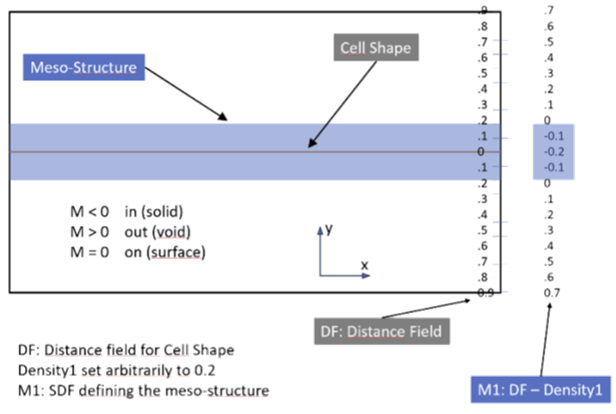
A signed distance field (SDF) is a scalar field that represents the distance from any point in space to the closest surface of an object. The field value is positive if the point is outside the object, negative if it is inside, and zero on the object's surface. SDFs support efficient distance queries and boolean-style combinations (union, intersection, offset) through simple mathematical operations, which makes them the primary representation inside a volumetric graph.
In the API, individual graph nodes produce or transform scalar, vector, or color fields. Output channels on each graph collect the final values for boundary shape, lattice structure, surface texture, and color. You connect your own nodes to these channels; you do not construct the internal evaluation kernel directly.
The visible boundary of an implicit object is extracted from a levelset — the set of points where the field equals a chosen constant. For solid geometry, the zero levelset defines the surface: points where the combined SDF equals zero lie on the boundary, negative values lie inside, and positive values lie outside.
Levelset calculation allows precise representation of smooth and topologically complex geometry because the surface is not stored as explicit faces and edges. Instead, it is derived at evaluation time from the field. Meshing, sampling, and rendering all operate on the evaluated field rather than on a traditional BRep.
A VolumetricModel contains two Graph objects that you populate through the API:
PrimaryGraph — global quantities that do not repeat: the boundary SDF, lattice and texture coordinate transforms, lattice and texture densities, and color.
CellGraph — unit-cell patterns tiled throughout the volume. Cell coordinates are normalized to the range [0, 1] in x, y, and z, defining a repeating hexahedral cell.
Each graph exposes fixed output channels (for example, BoundarySDF, LatticeDensity, CellLatticeShape). Your script adds nodes, sets their properties, and connects node pins to these channel inputs — see GraphOutputNodeTypes for the full channel list. The evaluator then combines all channel values using a fixed pipeline to produce the final levelset and color field.
At a conceptual level, evaluation proceeds as follows:
Coordinate mapping. For each mesostructure (lattice and texture), the corresponding coordinates channel maps a global point to a unit-cell point, wrapped into [0, 1] space.
Cell shape evaluation. The mapped coordinates are evaluated against the cell lattice shape or cell texture shape, producing a scalar value for each mesostructure.
Density combination. Lattice mesostructure = lattice shape − lattice density. Texture mesostructure = texture shape × texture density.
Boundary combination. Texture mesostructure is added to the boundary SDF. The maximum of that result and the lattice mesostructure becomes the final levelset.
Color. The color channel is evaluated independently and does not affect the levelset.
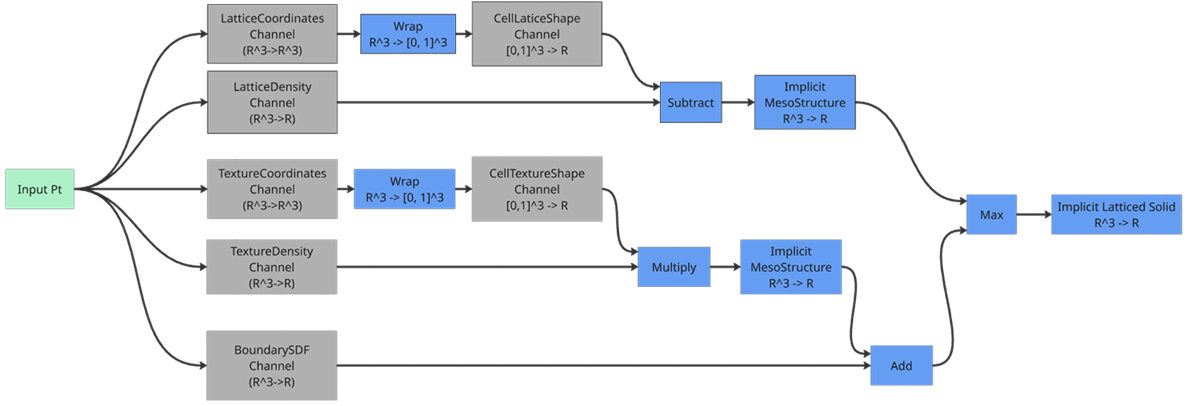
The diagrams above illustrate how channel outputs are combined. They show the evaluation pipeline, not a graph you are expected to build node-for-node. Your graphs connect user-defined nodes to the output channels listed in Graphs and channels.
A VolumetricModel is defined in its parent component's coordinate space. When the boundary body or referenced geometry lives in a subcomponent, you must supply the correct assembly context so the evaluator can transform geometry into the model's space.
Use createForAssemblyContext on BRep objects to create proxies that carry occurrence path information. This is the same pattern used throughout the Fusion API; see Documents, Products, Components, Occurrences, and Proxies for background.
import adsk.core, adsk.fusion, adsk.volume

# Boundary body in a subcomponent occurrence
body = extrude.bodies.item(0)
bodyProxy = body.createForAssemblyContext(occurrence)

volumetricCustomFeatureInput = features.volumetricCustomFeatures.createInput(bodyProxy)
volumetricCustomFeature = features.volumetricCustomFeatures.add(volumetricCustomFeatureInput)
volumetricModel = adsk.volume.VolumetricModel.cast(volumetricCustomFeature.volumetricModel)
For geometry-reference nodes, set the TransformReferenceGraphNodeProperty to the occurrence that provides the assembly context, and assign the GeometryGraphNodeProperty to the native or proxy geometry as required by the node.
| Scenario | Status |
| Boundary body in the same component as the volumetric feature | Supported — standard workflow |
Boundary body referenced via createForAssemblyContext from a direct child occurrence |
Supported — use proxy bodies as shown in the Volumetric Custom Feature Sample |
ReferencedGeometrySDF with BRep bodies and faces |
Supported — geometry must be in the correct assembly context |
| BeamNetwork references for discrete lattices | Supported — set via GeometryGraphNodeProperty |
| Deeply nested occurrence paths with multiple levels of transform | Use with care — verify results; behavior with complex paths is not fully documented |
| Referencing geometry from a different design document | Undefined — not supported |
C++ add-ins can register custom signed-distance-field evaluators through CustomSDFCallbackEventHandler and VolumetricModel.registerCustomSDFCallback. After registration, reference the callback from a ReferencedGeometrySDF node by setting GeometryGraphNodeProperty.customSDFCallbackID.
Threading. Callbacks are invoked during graph evaluation. Treat the handler as re-entrant: do not block, modify the document, or call back into volumetric evaluation from within the callback.
Numeric behavior. Return a signed distance in centimeters (Fusion internal units). Positive values indicate outside the surface, negative values inside, and zero on the surface — consistent with standard SDF conventions used by primitive nodes.
Debugging. Log sparingly; callbacks may be called millions of times per evaluation. Validate with VolumetricSampler on a coarse grid before meshing.
# Python: reference a registered callback ID on a geometry SDF node
import adsk.volume

primaryGraph = volumetricModel.getGraph(adsk.volume.GraphTypes.PrimaryGraphType)

sdfNode = primaryGraph.nodes.add("MySDF", "ReferencedGeometrySDF")
geomProp = adsk.volume.GeometryGraphNodeProperty.cast(
    sdfNode.properties.itemByName("geometry"))
geomProp.customSDFCallbackID = "MyCappedCylinderSDF"

boundaryChannel = primaryGraph.nodes.outputNode(
    adsk.volume.GraphOutputNodeTypes.BoundarySDFOutputNodeType)
sdfNode.outputPins.item(0).connect(boundaryChannel.inputPins.item(0))
Implement the distance function in C++ by subclassing CustomSDFCallbackEventHandler and registering it with VolumetricModel.registerCustomSDFCallback. Unregister with VolumetricModel.unregisterCustomSDFCallback. A capped cylinder, for example, would return the minimum distance to the cylindrical surface clamped by the cap planes.
Use VolumetricSampler to evaluate the implicit field at specific points without generating mesh geometry. This is useful for debugging graphs, exporting field data, or driving custom graphics.
Create a sampler from the VolumetricModel with VolumetricModel.createSampler. Set sample locations with setSamplePoints, setBoundingBoxSampling, or setPlaneSampling, then call evaluateDensity, evaluateLevelSet, evaluateColor, or evaluate on a specific graph node.
import adsk.core, adsk.volume

sampler = volumetricModel.createSampler()
if not sampler:
    raise RuntimeError("Failed to create VolumetricSampler.")

# Sample along a line in X at y=0, z=0
samplePoints = [adsk.core.Point3D.create(i * 1.0, 0, 0) for i in range(11)]
sampler.setSamplePoints(samplePoints)

densitySamples = sampler.evaluateDensity()
for sample in densitySamples:
    pt = sample.point
    print(f"{pt.x},{pt.y},{pt.z},{sample.value}")
evaluateDensity returns density values unscaled — exactly as the density channel evaluates. Do not divide results by 255. Use samplePointCount to check how many points are configured.
Related result types: VolumetricScalarSample, VolumetricVectorSample, VolumetricColorSample.
Implicit models lack explicit edges and faces. Converting a volumetric model to a mesh body is done with VolumetricModelToMeshFeatures and VolumetricModelToMeshFeatureInput. The parameters mirror the interactive Fusion command, but the workflow is API-only.
Refinement controls mesh density. Options are Low, Medium, High, or Custom. Preset levels target a similar number of sample points regardless of object size. Use Custom when you need explicit element size control.
Meshing approach selects between a traditional marching-cubes method and an advanced approach that better preserves sharp features on the boundary body. The advanced approach requires more processing time.
import adsk.core, adsk.fusion, adsk.volume

meshFeatures = component.features.volumetricModelToMeshFeatures
meshInput = meshFeatures.createInput(volumetricModel)

meshInput.isComputeSuspended = True
meshInput.isSmallShellsRemoved = True
meshInput.isVolumetricModelRemoved = True
meshInput.smallShellThreshold = adsk.core.ValueInput.createByString("0.05")
meshInput.meshingApproach = adsk.fusion.VolumetricMeshingApproachTypes.VolumetricMeshingAdvancedType
meshInput.refinementType = adsk.fusion.VolumetricMeshRefinementTypes.VolumetricMeshRefinementMediumType

meshFeatures.add(meshInput)