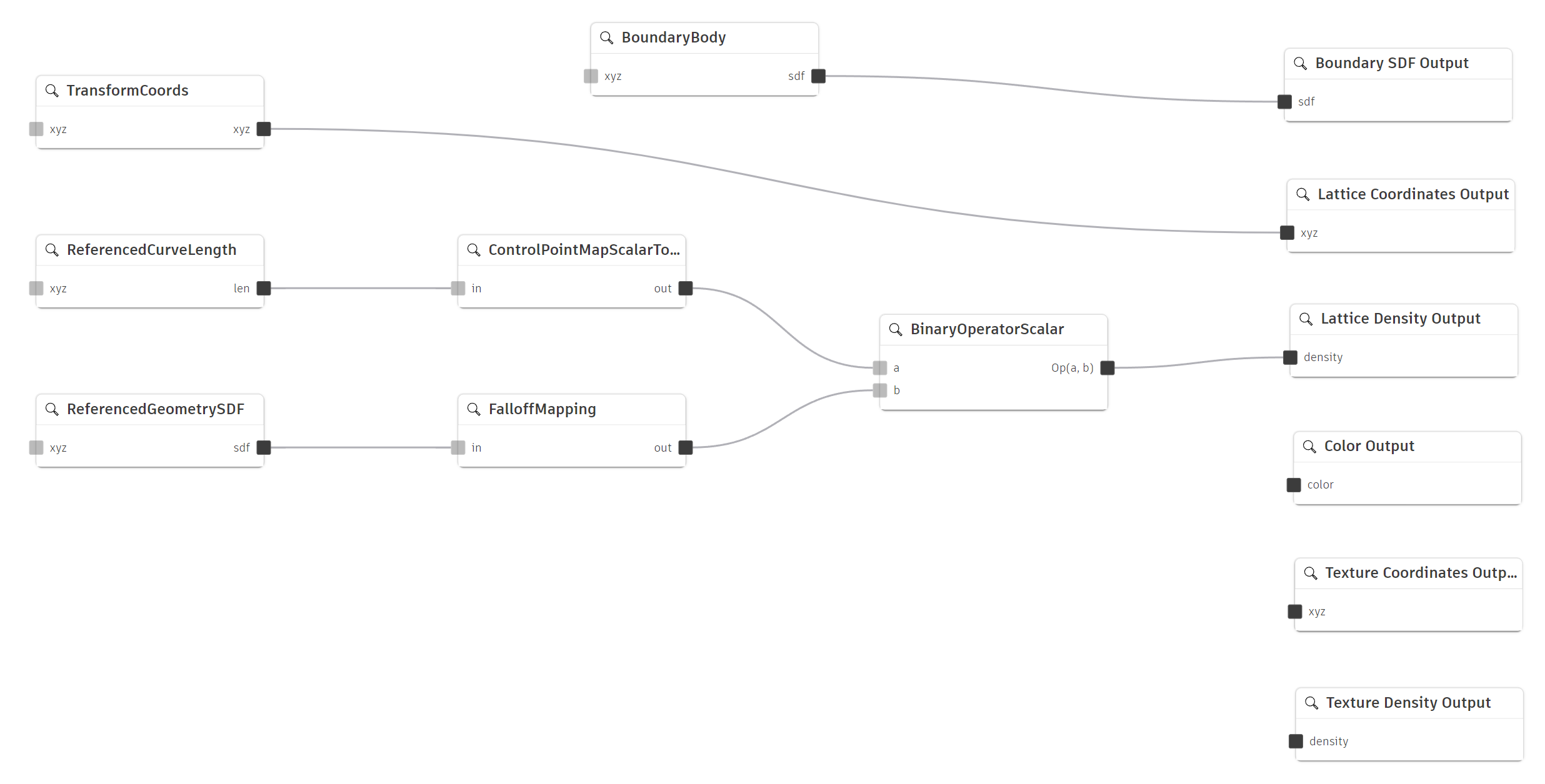
PrimaryGraph — global elements that do not repeat: boundary SDF, lattice and texture coordinate transforms, densities, and color.
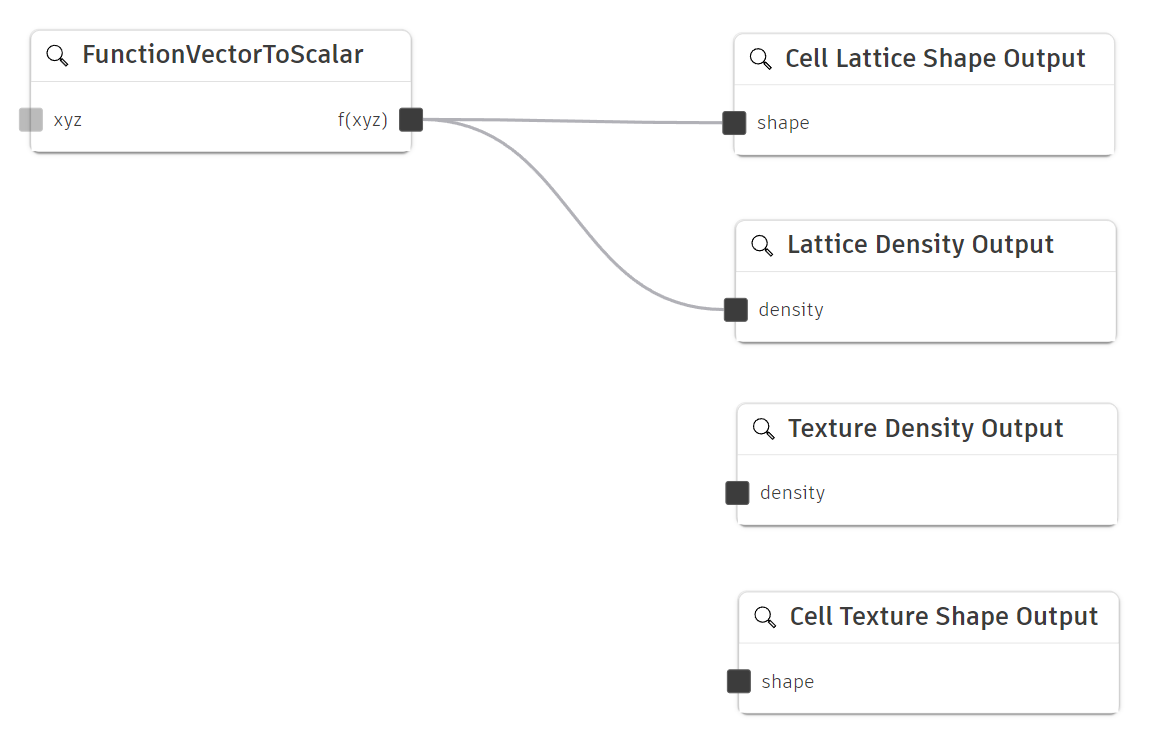
CellGraph — unit-cell patterns tiled throughout the volume. Cell coordinates are in the range [0, 1] in x, y, and z.
This topic explains how to build and manipulate volumetric graphs in code. For the API object model, see Introduction to the Volumetric Modeling API. For implicit modeling concepts and how output channels combine into a levelset, see Advanced topics.
A VolumetricModel is defined by two Graph objects: the PrimaryGraph and the CellGraph. Each graph is a directed acyclic graph (DAG) of GraphNode objects connected through pin-to-pin links. You add nodes, set properties, connect output pins to channel input pins, and validate the result before meshing or sampling.
Graphs represent the overall structure of the implicit modeling process, comprising nodes and connections that perform the mathematical operations necessary to define a volumetric field. Each model has two graphs:
PrimaryGraph — global elements that do not repeat: boundary SDF, lattice and texture coordinate transforms, densities, and color.
CellGraph — unit-cell patterns tiled throughout the volume. Cell coordinates are in the range [0, 1] in x, y, and z.
Nodes are the fundamental building blocks of a graph. Each node has:
Properties — parameters you set directly (for example, a scalar constant or a function string).
Input pins — receive values from other nodes.
Output pins — send values to other nodes or to output channels.
Use GraphNodes.add, GraphNodes.outputNode, and GraphNodePin.connect to build the graph programmatically. See the node reference for available node type strings and property types.
Connections link an output pin on one node to an input pin on another by calling GraphNodePin.connect. Data flows from outputs to inputs, enabling chained evaluation. Pin indices are zero-based. Inspect existing wiring with Graph.connectors or GraphNodePin.connectors.
Output channels are special nodes with one input pin and no output pins. They are the sinks of the graph — the paths through which evaluated data reaches the volumetric model. Retrieve a channel node with GraphNodes.outputNode and a GraphOutputNodeTypes value.
GraphOutputNodeTypes is an enumeration in adsk.volume that identifies which output channel to access on a graph. Primary-graph channels control boundary shape, lattice and texture coordinates and densities, and color. Cell-graph channels define the repeating lattice and texture unit-cell shapes. The table below maps each channel to its enum member, graph, input type, and role in evaluation.
| Channel | GraphOutputNodeTypes | Graph | Input type | Role |
| BoundarySDF | BoundarySDFOutputNodeType |
Primary | Scalar | Limits geometry to the desired boundary. Combined with mesostructures using max. |
| Color | ColorOutputNodeType |
Primary | Color | Defines color anywhere in the field. Evaluated independently of the levelset. |
| LatticeDensity | LatticeDensityOutputNodeType |
Primary | Scalar | Modulates lattice cell shape; subtracted from lattice shape to form lattice mesostructure. |
| LatticeCoordinates | LatticeCoordinatesOutputNodeType |
Primary | Vector | Maps global coordinates to cell coordinates for the lattice pattern. |
| TextureDensity | TextureDensityOutputNodeType |
Primary | Scalar | Modulates texture near the boundary only. Multiplied with texture shape. |
| TextureCoordinates | TextureCoordinatesOutputNodeType |
Primary | Vector | Maps global coordinates to cell coordinates for the texture pattern. |
| CellLatticeShape | CellLatticeShapeOutputNodeType |
Cell | Scalar | SDF of the repeating lattice unit cell, evaluated in lattice cell coordinates. |
| CellTextureShape | CellTextureShapeOutputNodeType |
Cell | Scalar | SDF of the surface texture unit cell, evaluated in texture cell coordinates. |
Graphs must be directed acyclic graphs: no path may form a loop. This prevents infinite evaluation cycles and ensures a well-defined evaluation order from inputs to output channels.
Graph pins use three data types:
Scalar — a single real number.
Vector — three scalars (x, y, z).
Color — four scalars (r, g, b, a).
The smallest useful volumetric feature uses a solid boundary body, relies on the default BoundarySDF channel (created automatically), optionally sets a constant lattice density, and converts to mesh with default settings. Use this to verify your toolchain before building more complex graphs.
import adsk.core, adsk.fusion, adsk.volume

app = adsk.core.Application.get()
design = adsk.fusion.Design.cast(app.activeProduct)
component = design.rootComponent

# Assume body is a solid BRep body to use as the boundary
features = component.features
customFeatures = features.volumetricCustomFeatures
customInput = customFeatures.createInput(body)
customFeature = customFeatures.add(customInput)
volumetricModel = adsk.volume.VolumetricModel.cast(customFeature.volumetricModel)

# Optional: set constant lattice density on the default graph
primaryGraph = volumetricModel.getGraph(adsk.volume.GraphTypes.PrimaryGraphType)
densityNode = primaryGraph.nodes.add("Density", "ConstantScalar")
densityNode.properties.itemByName("value").value = 0.5
densityChannel = primaryGraph.nodes.outputNode(
    adsk.volume.GraphOutputNodeTypes.LatticeDensityOutputNodeType)
densityNode.outputPins.item(0).connect(densityChannel.inputPins.item(0))

# Convert to mesh with defaults
meshFeatures = features.volumetricModelToMeshFeatures
meshInput = meshFeatures.createInput(volumetricModel)
meshFeatures.add(meshInput)
Before relying on evaluation results, check that the graph is well-formed:
Graph.canEvaluateGraph — returns whether the graph can be evaluated (no cycles, required channels connected, and so on).
GraphNode.hasValidProperties — returns whether a node's property values are valid for its type.
A minimal lattice wires constant density, a coordinate transform, and a gyroid cell shape:
import adsk.core, adsk.fusion, adsk.volume

primaryGraph = volumetricModel.getGraph(adsk.volume.GraphTypes.PrimaryGraphType)
cellGraph = volumetricModel.getGraph(adsk.volume.GraphTypes.CellGraphType)

# Constant lattice density
densityNode = primaryGraph.nodes.add("ConstantDensity", "ConstantScalar")
densityNode.properties.itemByName("value").value = 0.5
densityChannel = primaryGraph.nodes.outputNode(
    adsk.volume.GraphOutputNodeTypes.LatticeDensityOutputNodeType)
densityNode.outputPins.item(0).connect(densityChannel.inputPins.item(0))

# Lattice coordinate transform (asymmetric scale)
coordNode = primaryGraph.nodes.add("LatticeTransform", "TransformCoords")
coordNode.properties.itemByName("scaling").value = adsk.core.Vector3D.create(1, 2, 3)
coordChannel = primaryGraph.nodes.outputNode(
    adsk.volume.GraphOutputNodeTypes.LatticeCoordinatesOutputNodeType)
coordNode.outputPins.item(0).connect(coordChannel.inputPins.item(0))

# Gyroid cell shape
gyroidNode = cellGraph.nodes.add("gyroid", "FunctionVectorToScalar")
gyroidNode.properties.itemByName("function").value = (
    "(sin(x*pi2)*cos(y*pi2)+sin(y*pi2)*cos(z*pi2)+sin(z*pi2)*cos(x*pi2))*0.333333333+0.5"
)
shapeChannel = cellGraph.nodes.outputNode(
    adsk.volume.GraphOutputNodeTypes.CellLatticeShapeOutputNodeType)
gyroidNode.outputPins.item(0).connect(shapeChannel.inputPins.item(0))
Use a ControlPointMapScalarToScalar node to vary lattice density as a function of position:
# Map a scalar input (e.g. height) to a density range
mapNode = primaryGraph.nodes.add("DensityMap", "ControlPointMapScalarToScalar")
# Configure control points on the node's ScalarControlPointMapGraphNodeProperty, then connect:
densityChannel = primaryGraph.nodes.outputNode(
    adsk.volume.GraphOutputNodeTypes.LatticeDensityOutputNodeType)
mapNode.outputPins.item(0).connect(densityChannel.inputPins.item(0))
Control point map properties use ScalarControlPointMapGraphNodeProperty (addPoint, iterable count/item). For color ramps, use ControlPointMapScalarToColor with ColorControlPointMapGraphNodeProperty.
The TransformCoords, TwistCoords, and HomogenousTransformCoords nodes map global coordinates to cell coordinates. The example below applies non-uniform scale and a simple offset:
transform = primaryGraph.nodes.add("CellMapping", "TransformCoords")
transform.properties.itemByName("scaling").value = adsk.core.Vector3D.create(2, 1, 1)
transform.properties.itemByName("translation").value = adsk.core.Vector3D.create(0.1, 0, 0)

coordChannel = primaryGraph.nodes.outputNode(
    adsk.volume.GraphOutputNodeTypes.LatticeCoordinatesOutputNodeType)
transform.outputPins.item(0).connect(coordChannel.inputPins.item(0))
Surface texture uses TextureCoordinates, TextureDensity, and CellTextureShape in the Cell graph:
# Texture coordinate mapping on the primary graph
texCoord = primaryGraph.nodes.add("TexCoords", "TransformCoords")
texCoordChannel = primaryGraph.nodes.outputNode(
    adsk.volume.GraphOutputNodeTypes.TextureCoordinatesOutputNodeType)
texCoord.outputPins.item(0).connect(texCoordChannel.inputPins.item(0))

# Constant texture density near the boundary
texDensity = primaryGraph.nodes.add("TexDensity", "ConstantScalar")
texDensity.properties.itemByName("value").value = 0.3
texDensityChannel = primaryGraph.nodes.outputNode(
    adsk.volume.GraphOutputNodeTypes.TextureDensityOutputNodeType)
texDensity.outputPins.item(0).connect(texDensityChannel.inputPins.item(0))

# Texture cell shape in the cell graph
texShape = cellGraph.nodes.add("surfacePattern", "FunctionVectorToScalar")
texShape.properties.itemByName("function").value = "sin(x*pi2)*0.5+0.5"
texShapeChannel = cellGraph.nodes.outputNode(
    adsk.volume.GraphOutputNodeTypes.CellTextureShapeOutputNodeType)
texShape.outputPins.item(0).connect(texShapeChannel.inputPins.item(0))
Wire a constant or computed color to the Color output channel:
colorNode = primaryGraph.nodes.add("BaseColor", "ConstantColor")
colorNode.properties.itemByName("value").value = adsk.core.Color.create(255, 128, 0, 255)

colorChannel = primaryGraph.nodes.outputNode(
    adsk.volume.GraphOutputNodeTypes.ColorOutputNodeType)
colorNode.outputPins.item(0).connect(colorChannel.inputPins.item(0))
When both lattice and texture mesostructures are connected, the evaluator combines channels using the fixed order described in Graph evaluation. Wire all lattice and texture channels before meshing:
# BoundarySDF is created by default when the volumetric model is created.
# Ensure lattice channels (LatticeCoordinates, LatticeDensity, CellLatticeShape)
# and texture channels (TextureCoordinates, TextureDensity, CellTextureShape)
# are each fully connected. The evaluator combines them automatically:
#   levelset = max(latticeMeso, boundarySDF + textureMeso)
Function expression syntax for cell-shape nodes is covered in Volumetric Function Expression Syntax.