Interference analysis for additive manufacturing
The Interference Analysis  tool checks selected components for interference with each other and with no-build zones on the build platform. Even when components do not overlap one another, Fusion reports an interference if a component occupies a no-build zone.
In the Browser, each analysis is stored under your setup in Additive Analysis in an Interference Analysis folder. Each interference analysis item shows a status: a warning icon when an interference is detected, or a green checkmark when there is no interference.
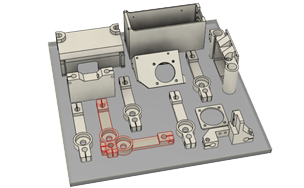
Example of colliding components highlighted in red.