Work on projects with hub members
Fusion data is stored in the cloud, in hubs. A hub is a shared space set up by an administrator where you and, if applicable, your collaborators work on projects. Projects contain your designs and data, which can be organized into folders. Folders and projects are permission-controlled, meaning only the people granted access to them can see their contents.
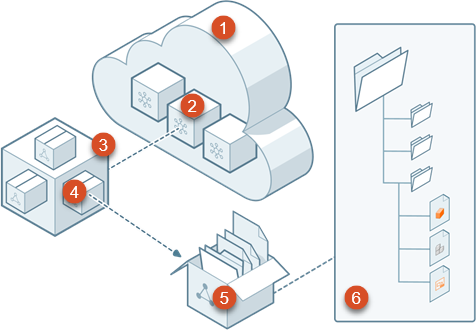
- Cloud: Secure data storage on the web across your organization.
- Hubs: Collaborative spaces inside the cloud where you and other members work on projects. Usually requires an invitation or approval from an administrator.
- Hub expanded view: Illustration of a hub containing multiple projects.
- Project: Space dedicated to ongoing work on a specific project. Each project in a hub can have its own custom access permissions.
- Project expanded view: Illustration of a project containing folders, subfolders, and designs.
- Folders, subfolders, and designs: Storage areas and designs within a project. Every folder in a project can have its own custom access permissions for members. Folders can also exist at the root level of a hub.
Note: If you haven't used Fusion in a while, you might need to upgrade your projects to support new features. See this Support article for instructions: How to upgrade a Legacy project to Folder-Level project in Fusion.