Hydrostatic pressure load in the Simulation workspace
Hydrostatic pressure loads are used to simulate the pressure exerted on an object in contact with, or submerged, in a fluid.
| Study Types that offer this load option | |
|---|---|
 Thermal stress study Thermal stress study |
 Static stress study Static stress study |
 Modal frequencies study Modal frequencies study |
 Structural buckling study Structural buckling study |
 Shape optimization study Shape optimization study |
 Nonlinear static stress study Nonlinear static stress study |
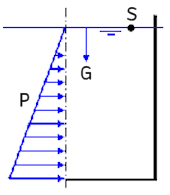
The hydrostatic pressure load applies a linearly varying pressure to the selected faces, representative of how pressure increases with the depth of a fluid. Gravity must be enabled, since the direction of the gravity vector controls the direction in which the pressure increases. The first time you apply a Hydrostatic Pressure load, gravity is enabled automatically (after you are notified by a pop-up message).
The pressure load is always normal to the selected faces.
The following image shows how pressure (P) increases with fluid depth. G indicates the direction of gravity and S is a point on the fluid surface:
Select one of the predefined fluids or choose Custom and specify the fluid density manually.
Choose a vertex on the model to indicate the elevation at the top surface of the fluid, where the pressure is zero. You can offset the surface elevation by dragging the manipulator arrow or by entering the Offset Distance.
Be sure that your gravity vector is correctly defined.