Subgraphs
A subgraph is a nested graph embedded inside a parent graph. It groups a set of nodes and wires into a named unit that you can invoke like a regular node from the parent canvas. Use subgraphs to reduce visual complexity at the top level or to encapsulate logic that you place multiple times on the same canvas.
When you need to share the same logic across multiple graphs (even across different packages), use a reusable subgraph instead. A reusable subgraph is a standalone .graph.json file that any graph can include as a node. Editing the source file updates every graph that uses it. See Reusable subgraphs.
Subgraph types
Subgraphs have three specializations:
- Standard: Runs its inner graph once and returns the output values to the parent.
- For-Each: Runs its inner graph once for each item in a list.
- While: Runs its inner graph repeatedly until a break condition is met.
For-Each and While loops are covered in Loops.
Boundary nodes
Every subgraph has two special nodes that define its interface with the parent graph.
Subgraph Input is the source of all values passed in from the parent. When you add an input port to a subgraph, a corresponding output port appears on the Subgraph Input node. Inner nodes connect to those output ports to receive the values.
Subgraph Output collects the values a subgraph returns to the parent. When you add an output port to a subgraph, a corresponding input port appears on the Subgraph Output node. Inner nodes wire their results into those input ports.
Adding and removing ports
Add ports to a subgraph by dragging a wire from an upstream node to the Add Input port, or from the Add Output port to a downstream node. You can also drag from inside the subgraph to the boundary nodes. Port names are derived from the connected output or input label. When two ports would have the same name, Fusion adds a suffix (_1, _2, and so on) to keep them distinct.
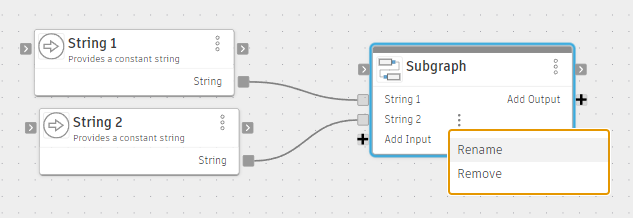
To rename a port, place the pointer over the port label on the subgraph node until More  appears, then click it and select Rename. Alternatively, select the subgraph node, open the Node tab in the Details panel, and edit the Port name box next to the port in the Inputs or Outputs section.
To remove a port, place the pointer over the port label on the subgraph node until More appears, then click it and select Remove. Alternatively, select the subgraph node, open the Node tab in the Details panel, right-click the port in the Inputs or Outputs section, and select Remove.
Navigating subgraphs
To enter a subgraph, double-click the subgraph node on the parent canvas, or right-click it and choose Enter subgraph. The breadcrumb bar at the top of the editor shows your current position in the graph hierarchy. Click any breadcrumb to navigate back up to a parent graph.
Subgraphs can be nested. Each level of nesting adds a segment to the breadcrumb. To exit a subgraph without navigating the breadcrumb, right-click the canvas inside the subgraph and choose Exit subgraph.
How subgraphs run
When Fusion starts a subgraph node, it runs the inner graph in a fresh nested instance. The Subgraph Input node is seeded with the values provided by the parent. Inner nodes are evaluated on demand. When the inner graph finishes, the values wired into the Subgraph Output node are returned to the parent. A standard subgraph runs exactly once.