The image below shows the key features of the user interface.
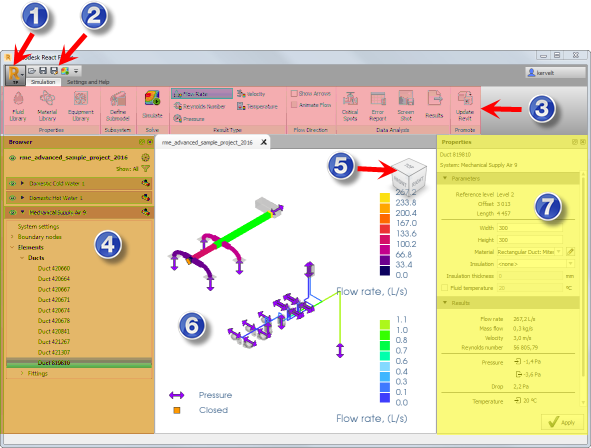
Legend
- Application Button
Opens the Application Menu. Use the Application Menu to open or save a project. The Application Menu also allows you to access application options.
-
Quick Access Toolbar
Provides access to frequently used commands. To add a command, right-click a command in the ribbon, and then select Add to Quick Access Toolbar
-
Ribbon
Contains the application commands. The application commands are organized into logical panels and tabs. Place your cursor over any command to display a tooltip showing information on the command.
-
Browser
Displays a tree view of all the elements of your model. Use the Browser to select or display elements in the Model Pane.
- ViewCube
Use the ViewCube to manipulate your model.
- Model Pane
The display and editing area of the structure.
-
Properties Panel
Displays the properties of the elements selected in the Model Pane, or in the Browser.