• Help Home
  • Quick Links
    • What's New
    • Release Notes
    • Essential Skills Video Tutorials
    • Essential Concepts
    • The Alias Workspace
    • Keyboard Shortcuts
    • Subdivision Modeling tutorials
  • English (US)
    1. English (US)
    2. 简体中文
    3. 日本語
Alias 2025
    • Alias What's New
      • What's New in Alias 2025
      • What's New in Previous Releases
    • Alias Release Notes
    • Tutorials
    • Interface Reference
    • Tool Palette Reference
    • Menus Reference
    • File Format Reference
    • Alias Dynamo User Guide
    • Flow Production Tracking for Automotive Design
    • Environment Variables
    • Alias Programmers’ Interfaces (API)
      • Adding your plug-in to the UI
      • Building Options Boxes
      • Building the included examples
      • Class reference
      • Compiling and linking
      • Implementation Details
      • Introduction
      • Plug-in API Examples
      • Setting up plug-ins
      • The universe and its objects
        • The Universe
        • Cameras
        • Lights
        • Curves and Faces
        • Surfaces
        • Clusters
        • Sets
        • Animation and Rendering
        • Shaders and Textures
      • Using OpenAlias
      • Using the API
      • Writing a plug-in
    • Autodesk Installation
    • Legacy Getting Started
    1. Alias Programmers’ Interfaces (API)
    2. The universe and its objects
    3. Sets
    Share
    • Email
    • Facebook
    • Twitter
    • LinkedIn

    Sets

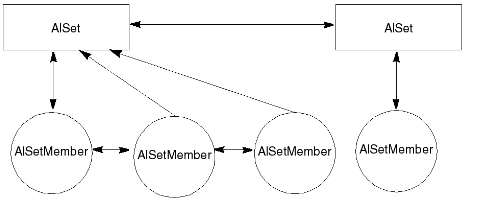
    This diagram shows some sets and their set members. A set has no DAG node and is not in the DAG; to get the global list of sets, use the AlUniverse::firstSet() method. To create a set, instantiate and create an AlSet and add members to the set. As with cluster members it is not possible to create or delete individual AlSetMember objects instead, they are created when objects are added to or removed from the set.

    Parent page: The universe and its objects

    Was this information helpful?

    Except where otherwise noted, this work is licensed under a Creative Commons Attribution-NonCommercial-ShareAlike 3.0 Unported License. Please see the Autodesk Creative Commons FAQ for more information.

    • Privacy Statement
    • Legal Notices & Trademarks
    • Report Noncompliance
    • © 2025 Autodesk Inc. All rights reserved