
Subscribe to Folder
You can subscribe to a folder to receive notifications when a file is:
Uploaded to the folder: This includes uploading a new file or a new version of a file which already exists in the folder.
-
Note: See the File and Folder Actions help topic for other actions you can access from folder tree, action bar, and files list.
- Permission Required to Subscribe to a Folder
- How to Subscribe to a Folder
- How to Unsubscribe to a Folder
Permission Required to Subscribe to a Folder
You need View only permission or above to subscribe to a folder.
How to Subscribe to a Folder
Hover your cursor over a folder from the folder tree and click the More menu
 .
.Hover over More and click Subscribe to folder.
You can choose to subscribe to:
This folder only to receive notifications about only this folder; or
This folder and all subfolders to receive notifications about this folder and its subfolders.
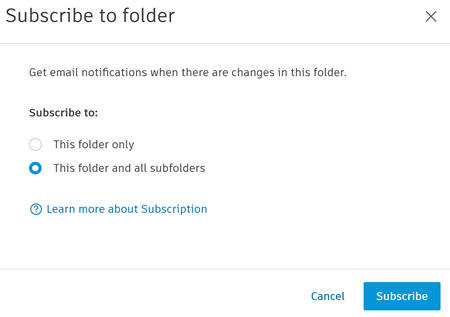
Click Subscribe.
You will receive an email notification when a file is uploaded or copied to the folder that you've subscribed to.
How to Unsubscribe to a Folder
To unsubscribe to a folder:
Click the More menu
of a folder that you've subscribed to from the folder tree.Hover over More and click Unsubscribe.
You will no longer receive an email notification when a file is uploaded or copied to that folder.