
Issue:
When installing Autodesk products 2023 and above the following message appears:
The install couldn’t finish.
Error 1603
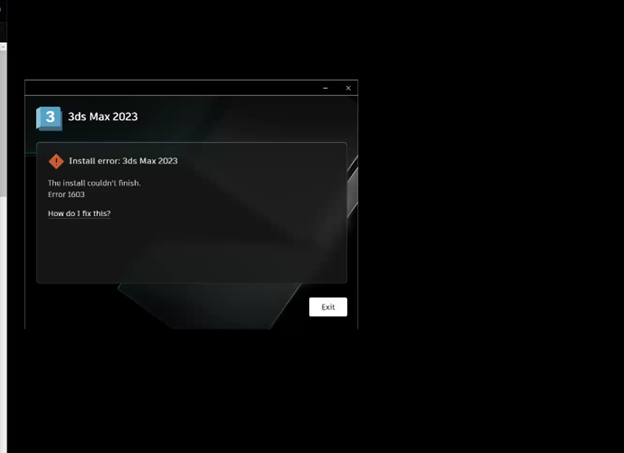
Causes:
In the Summary.log in %localappdata%/Autodesk/ODIS there is an error message similar to the following:Bundle: Autodesk 3ds Max 2024
Installation Failure in Bundle: Autodesk 3ds Max 2024
Application Name : 3ds Max 2024
Package Name : 3ds Max 2024
Error code : 1603
Error Context: 1: LicensingCustomAction.licRegister [I] [13:14:22:477]: [ADLM_EULA_COUNTRY]: US 1: LicensingCustomAction.licRegister [I] [13:14:22:478]: [ACADLICENSESERVERTYPE]: 1: LicensingCustomAction.licRegister [I] [13:14:22:478]: [CONSUMER]: 1: LicensingCustomAction.licRegister [I] [13:14:22:478]: Running "C:\Program Files (x86)\Common Files\Autodesk Shared\AdskLicensing\13.0.0.8122\helper\AdskLicensingInstHelper.exe" register --upgrade -pk 128P1 -pv 2024.0.0.F -cf "%TEMP%\{A54AED8B-2D32-3795-8962-12E42ED4A767}\x64\max\3dsMaxConfig.pit" -el US -sn 000-00000000 -sk 00000 1: LicensingCustomAction.licRegister [E] [13:14:22:572]: exit code: 100, output: (500)(saving feature failed: ENCODED{/TN6xFeYeJyVOtDrfN/YrfQY+CFUgE9VfUTx5rAQgx7xwRgSCKYXF553xx10G1yNcPcmrre0D9q63msXTeHilJ60KeTsnTFaz1kKMxs4uKFCdcLdmucy4NpJihpFn1Pe5kRjDtG26T6yqOAU8A7g12R+aEOfxnxwhc1gLY57VOM1upzVrUSa6eNB+iL6eXDTt2vzcE2Yqrmn6ycVtQb7djHfrSI/M4J2xsa3YWM0QGlDPGVzkUNYdn72wIkK1bD1}) hint: might be caused by invalid feature for current pit file. Action ended Return value 3 1: LicensingCustomAction.licRegister [E] [13:14:22:572]: Registering a product with key 00000 and version 2024.0.0.F failed CustomAction licRegister.8B858D99_2C63_4281_AE43_6782314CCC1B returned actual error code 1603 (note this may not be 100% accurate if translation happened inside sandbox) MSI (s) (EC:34) [13:14:22:577]: Note: 1: 2265 2: 3: -2147287035 MSI (s) (EC:34) [13:14:22:578]: User policy value 'DisableRollback' is 0 MSI (s) (EC:34) [13:14:22:578]: Machine policy value 'DisableRollback' is 0 Action ended 13:14:22: InstallFinalize. Return value 3.
Please explore possible solution from: https://knowledge.autodesk.com/search-result/caas/downloads/content/autodesk-licensing-service-release-notes.html&mktvar002=45103257008%7CEML
**************************** End ***************************
Solution:
To resolve the issue:- Type "Services" on the Windows Start button.
- Double-click the "Autodesk Desktop Licensing Service" service to open it.
- Go to the "Log On" tab.
- Select "Local System account".
- Check mark the box for: "Allow service to interact with desktop".
- Apply changes.
- Stop the "Autodesk Desktop Licensing Service".
- Start the "Autodesk Desktop Licensing Service".
- Run the Setup.exe for the affected program.