
After selecting the Bay option the dialog appears on the screen.
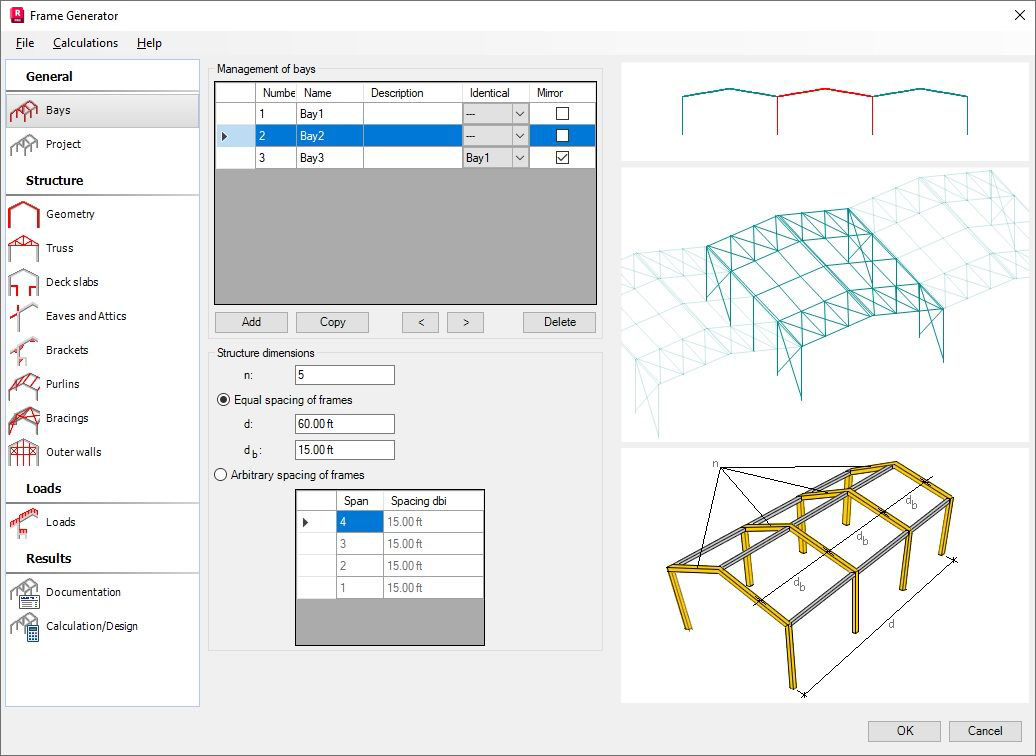
In the upper part of the dialog, there is a table containing the defined bays of the structure. The table contains the editable columns of the table: name and description.
Moreover, the following columns are available:
Identical to - selection of a bay, which is supposed to be the original for the defined bay; NOTE: change of parameter in the original bay is copied to all the bays associated with the model
Mirror - the option is available for the copied bays; activating this option creates the additional possibility to define the mirror reflection of the original bay.
The buttons include the following:
- Add - adds another bay to the table
- Copy - copies a selected bay and creating another bay to the bay table; moreover, the original bay will be indicated in the Identical to column
- <, > - shifts a selected bay up/down in the bay table
- Delete - deletes a selected bay.
The particular bays are represented in Geometry as tabs.
In order to change parameters of the bay for which the option Identical to is activated, use the Edit bay parameters link located on every tab with the copied bay in Geometry (the bay will remain identical to the original one) or delete the Identical to option from a given bay (the bay will become independent of the original bay).
The structure dimensions can be defined in the lower part of the tab:
- number of frames (structure 'depth')
- spacing of bays:
equal spacing of frames - spacing and the total length (depth) of the structure should be indicated
Arbitrary spacing of frames - enter spacing between the subsequent frames.