
Determine your working directory (windows)
Before proceeding, you must decide from where you want to store and install the repositories. In this example, for demonstration purposes, we will create a directory called shotgridDemo in our Default user directory.
To create this directory, open a file explorer and navigate to the directory in which you want to create a new folder. Select New Folder.
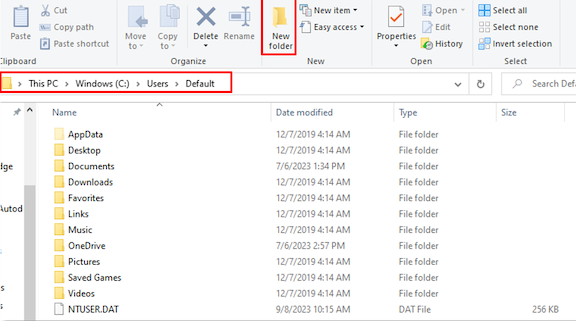
Name the new directory.
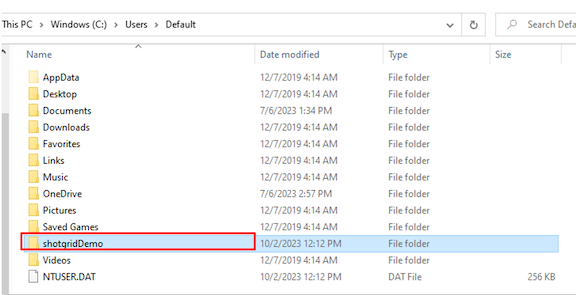
Next, extract the python-api clone from its current location to the new directory you just created.
In this example, the ZIP file we downloaded was saved in C:\Users\Default\Downloads
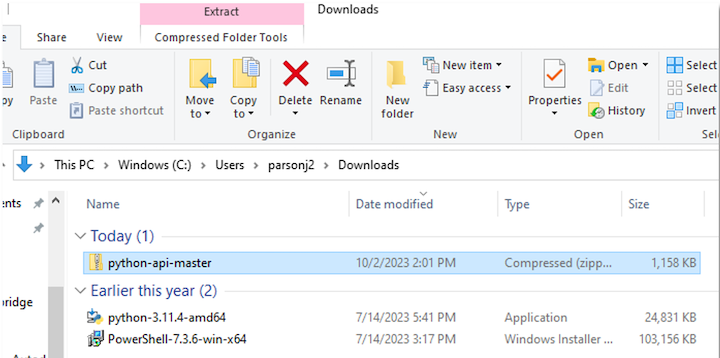
If you are unsure where the python api is located, search for python-api-master on your computer. Once you’ve located the files, right click over the python-api-master ZIP file and select Extract All…
You will be prompted to choose which directory you want to extract the downloaded code to. Select whichever folder you plan to use and choose Extract. Once extracted, you will be able to see the unzipped python-api-master folder in your chosen directory.
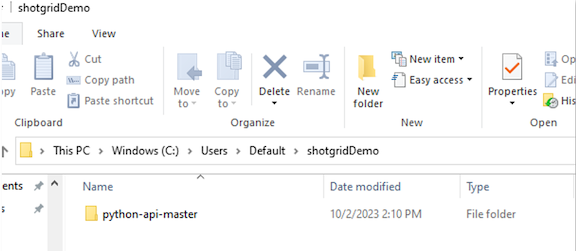
With your files downloaded and in your desired working directory, you’re now ready to connect Python and the Python API.