
Create a Flow Production Tracking script (windows)
Log into Flow Production Tracking to create a new script entity record for the Flow Production Tracking Python API. From your Flow Production Tracking site, go to the Admin menu and select Scripts.
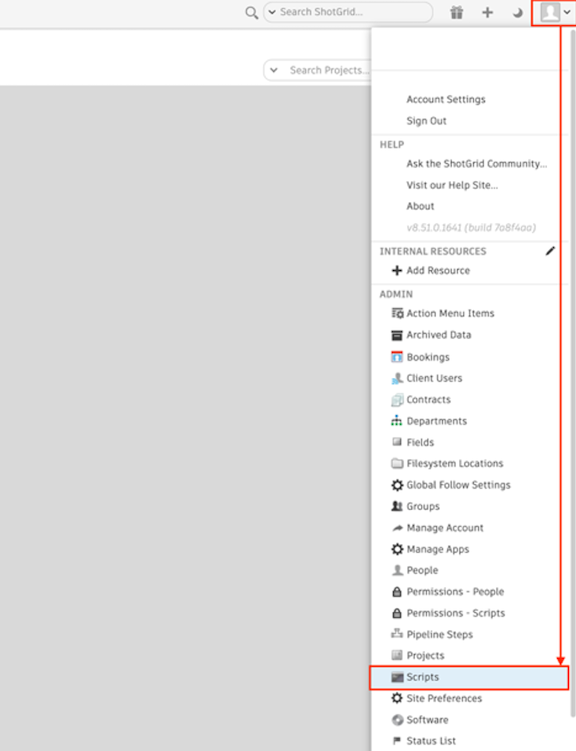
From the Scripts page, select Add Script.

Create the following Script entity record.
| Entity Type | Script Name | Script Description |
|---|---|---|
| Script | python_script | Script for Flow Production Tracking Python API |
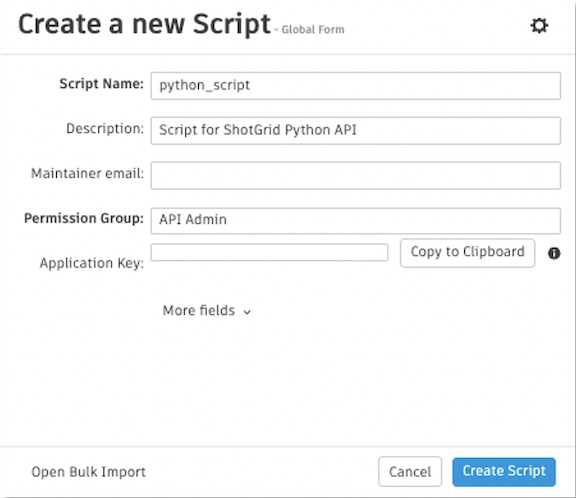
Before selecting Create Script, copy the Application Key for your records and keep it in a secure place. You will need this later.