
Creative Review (BETA) - February 2026 update (What's New since February 2026)
Creative Review is still in Beta, and we intend to release regular updates to improve it, adding new features or addressing your comments and suggestions.
This February update focuses on Live Review and introduces the following:
Your feedback is essential, so please reach out using the community forums.
Live Review set to Collaboration Mode lets the host and participants add annotations, create notes, and control playback.
Presentation Mode
In Presentation Mode, one person leads the Live Review session and others watch. The host is the presenter and has full control: only the presenter can control playback, add annotations, and add notes. Participants join as viewers who can watch and follow along but cannot control playback or add content.
To change who is presenting, the current presenter can click Make Host next to a participant's name in the Live Review tab.
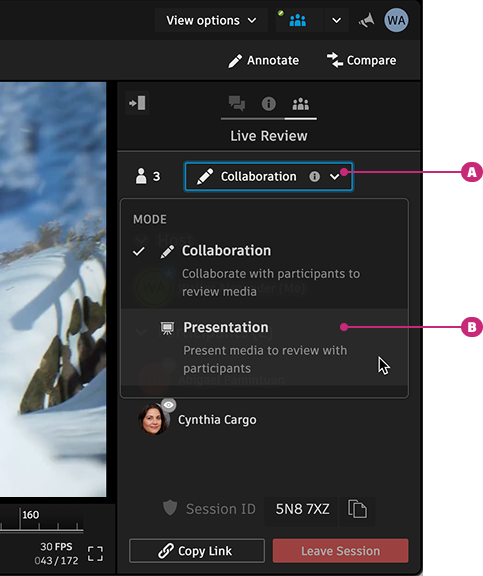
A Mode selection menu. B Presentation Mode option.
For step-by-step instructions, see Using Presentation Mode in Live Review.
Collaboration Mode
In Collaboration Mode, multiple participants can interact and provide feedback during the Live Review session. Participants can add annotations, add notes, and control playback themselves. The host still manages the session and can switch between Presentation Mode and Collaboration Mode at any time during the session.
To start in Collaboration Mode, the host selects Collaboration Mode during an active session using the mode selector in the Live Review tab.
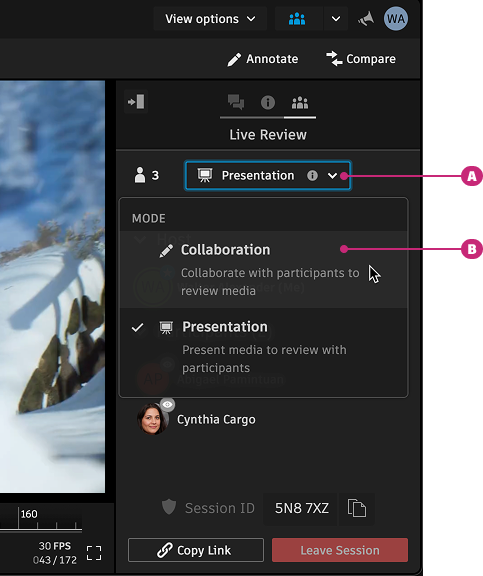
A Mode selection menu. B Collaboration Mode option.
For step-by-step instructions, see Using Collaboration Mode in Live Review.
RV connects to Creative Review Live Review
RV 2025.1 can connect to Live Review sessions that were created from Creative Review. When a session is created from Creative Review, both Creative Review users and RV users can join the same session. If you receive a link to a Creative Review Live Review session, you can join it from RV. Your capabilities in the session (for example, controlling playback or adding annotations) depend on the session's mode (Presentation Mode or Collaboration Mode) as selected by the host.
Sessions created from RV can only be joined by other RV users. Sessions created from Creative Review can be joined by both Creative Review users and RV users.
For details on joining and using Live Review in RV, see Live Review in RV (Beta).
Documentation
To learn more about Creative Review, check out our documentation here.
For Live Review specific features, see Reviewing media with others with Live Review.
Release Information
Version:
8.82
Release Date:
February 2026