Point: Angle and Delta X
Add a point that is located at a specified angle and offset from another point.
Properties
Specify the following parameters in the Properties panel.
| Point | |
| Point Number | Specifies the point number. You can change the automatically generated Point Number value. |
| Point Codes | Specifies the codes assigned to the point. |
| Point Geometry Type | |
| Type | Specifies the point type: |
| Point Geometry Properties | |
| From Point | Specifies the point to which the other geometry property values are relative. |
| Reference Point | Specifies the point that, with the From Point, forms the baseline from which the Angle is relative. |
| Reverse Angle Reference | Reverses the Angle, drawing the point in the opposite direction. |
| Angle | Specifies the angle from the baseline created between the From Point and Reference Point. Note: If Reference Point is set to None, the Angle is from the positive Delta X value. a positive angle value is drawn counterclockwise from the Delta X, and a negative value is drawn clockwise from the Delta X.
Click [...] to open the Expression Editor, where you can enter or calculate a value. |
| Delta X | Specifies the offset difference from the point specified in the From Point row. Click [...] to open the Expression Editor, where you can enter or calculate a value. |
| Offset Target | Specifies the offset target parameter. When an offset target is specified, the offset of the target object overrides the specified Delta X value. |
| Auto Add Link | |
| Auto Link To From Point | Draws a link from the point specified in the From Point row to the current point. |
| Name | Specifies the name of the link. |
| Codes | Specifies the codes assigned to the link. |
| Miscellaneous | |
| Comment | Indicates notes about the point. Comments can be displayed in the Preview panel. |
Examples
To see examples of how this geometry element is used, open the following Sample PKT file:
Point Angle and Delta X.pkt
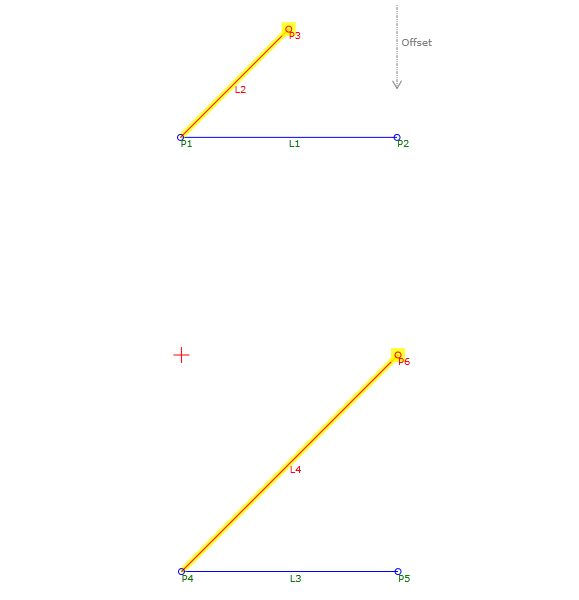
The example PKT contains two Angle and Delta X point examples. Each Point Geometry Type is defined by Angle and Delta X parameter values, and the Delta X value may be overridden by a specified offset target parameter. The same Delta X value is used in both examples. The Static Delta X (P1 to P3) example applies the value, but the Offset Target example uses an offset target parameter that overrides the static Delta X value.
In the Flowchart, each example is constructed in a separate sequence. To review the parameters, select the Angle and Delta X point in the appropriate sequence, and then see the Point Geometry Properties section of the Properties panel.