Guide to creating a new material and assigning a cost per kg for each of the individual gauges.
Material creation
- Go to File
 Setup Database Fittings
Access the Materials dialogue.  Click the New icon for creating a new material.
 - Give the material a name and a group. Also try to specify a Density for the material weight calculation to be successful.
- Assign a material abbreviation if to be used in your reports.
- Confirm the new material by selecting OK.
Create multiple gauges clicking the new icon above the Gauge column.- Each gauge can be given a cost per kg and a default sheet size on its creation.
- Click OK to the Database editor to confirm the additional material(s).
Applying a Wastage allowance
- Go to File Setup Database Costing Wastage.
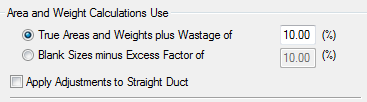
- Select whether to apply wastage in the form of the True part areas and weight for developments plus an additional percentage OR The Blank size of the development (square size) minus a percentage.
- Enter a percentage for the method.
- Select the option whether to include Straight items into the additional wastage calculations or leave blank if you require NO wastage on Straights.
- Confirm the changes by selecting OK to the database.