This option is used to define the distribution of reinforcement. There are several ways to access this option:
- Menu : Reinforcement > Reinforcement distribution
- Ribbon : ASD - Reinforcement > Reinforcement - definition > Reinforcement distribution
- Toolbar: Reinforcement - definition > Reinforcement distribution

- Command line: RBCR_DEF_BAR_DISTRIBUTION.
The following dialog displays:
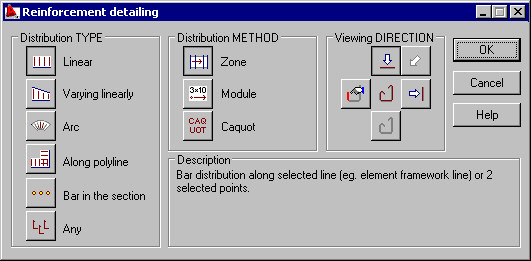
The dialog is divided into three primary parts:
On the left side of the dialog, in the Distribution type field, specify the type of reinforcement distribution.
 linear - bar distribution along a selected line (e.g. the line of an element formwork) or along two indicated points
  varying linearly - bar distribution within the region indicated (e.g. a formwork element of variable height); the height of a bar being distributed will be adjusted automatically to the formwork shape (prior to distribution, you can indicate reinforcement segments whose length changes during distribution)
  arc - bar distribution along the indicated arc
  along polyline - bar distribution along the indicated broken line (polyline)
  distribution: reinforcement as a point (bar in a section) - graphical representation of a bar in a section
  any (all options in the right part of the dialog are not available); you can distribute a selected bar or bars; in the latter case, bars are distributed as a group.
Once the distribution type is selected, the method of reinforcement distribution is defined. The only exception constitutes the point reinforcement which requires neither defining a distribution method nor the direction of viewing the reinforcement. The following methods of reinforcement distribution are available:
 zone method - a formwork element is divided into several regions (zones); in each of the designated zones, you define reinforcement spacing independently
  module di stribution - reinforcement spacing is defined by specifying the order of spacing in the following form, e.g. 3x25, 5, 6x15, etc. with respect to the base point, and next, with respect to the bar defined recently in the distribution
  Caquot distribution - a simplified method of reinforcement distribution which consists in specifying the length of distribution as well as initial spacing and maximum spacing; spacing values are calculated based on a simple method maintaining the spacing values obtained as a result of applying the method.
Finally, a manner of presenting the reinforcement distribution should be determined:
 top view
  side view
  as an indicated segment; once this option is activated, the selected bar is distributed and the distribution drawing shows the actual geometry of the chosen bar segment
  projection
  any.
any.
Click OK; the dialog closes and reinforcement is distributed according to the definition.
For the distribution types: linear and varying linearly all the options provided in the dialog are available. For the distribution type: any, the distribution methods are inaccessible, whereas the viewing direction is available identically as in the case of the linear distribution.
For the bar distribution as a point, both the methods and view direction are unavailable. Once the OK button is clicked, the Reinforcement - point dialog opens.
The bottom part of the dialog displays the description of an option selected in the dialog.
See also:
Generation of distribution varying linearly and detailed table