Modify the number, gap and spacing of girders within a girder group, girder group material properties, as well as modify the exterior and interior girder types for a girder group.
To apply and reset girder group changes
Once you have modified settings for a girder group, you can choose to apply those settings to all girder groups in the selected bridge, or reset all girder group settings for the bridge to the default girder group settings for the current bridge style.
- Select a girder group and perform any desired modifications.
- Right-click on the girder group and hover over Apply To...
- Click All Girder Groups.
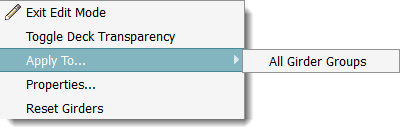
Note: Click Reset Girders to reapply bridge rules (determined by the bridge style) to all girder groups within the selected bridge.
To modify the number, gap and spacing of girders within girder groups
- Select a Girder Group to display the Girder Group asset card.
- Click
 in the
Utility Bar to enter Edit mode
in the
Utility Bar to enter Edit mode
- Expand the Attributes tab.
- Click on the underlined value next to Number of Girders, Start Gap, End Gap, Start Spacing and/or End Spacing, and input the desired values.
- Press Enter to update the selected girder group.
Note: The girder group start and end station values are read-only and cannot be edited from the asset card. Girder group start and end station locations are defined by the order in which a user first drew the related design road. A girder group start station is closest to the road startpoint.
To modify exterior and interior girder type for a girder group
- Select a Girder Group.
Note: You cannot modify exterior and interior girder type for a steel girder group.
- Click
in the
Utility Bar to enter Edit Mode.
- Click on an orange girder component type next to Exterior or Interior. A catalog of corresponding girder component types will appear in the Select Component catalog.
- Double-click a girder component style in the catalog to apply to the selected interior or exterior girder style type.
Additional tips
Review and modify Girder Group properties through the Properties Palette. Select the Girder Group, right click and choose Properties. Enter Edit mode and click the desired field(s) to modify.