Available in Inventor 2016 R3 - Subscription customers
The Connected Design on A360 Panel allows you to:
- Post comments.
- Monitor Design Share events for all your Design Shares that you own and the Design Shares you are a collaborator of.
- Access the Start Design Share on A360 dialog box.
- Filter events.
To access:
In Inventor 2016 R3, click the Design Share button
 located in the bottom right of the graphics window. The Design Shares on A360 Panel displays the most recent events at the top.
The panel displays:
- Collaborators invited to the Design Shares and the time a collaborator was invited.
- Collaborators who viewed the 3D Viewable and the time the 3D Viewable was viewed.
- Comments posted by collaborators and the time the comment was posted.
- Comments posted by you and the time the comment was posted.
- A list of all Design Shares you created.
- A list of all Design Shares of which you are a collaborator.
Options
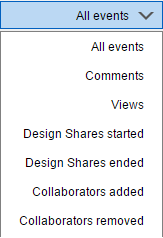
- Filter the display: Select the events drop-down menu
 filter for the following events:
- All events
- All comments
- View only
- Sessions created only
- Sessions ended only
- Collaborators added only
- Collaborators removed only
- Search: Searches through the entire event library.
- Events tab: Displays the events of the Design Shares you created and the Design Shares you were invited to join.
- Design Shares tab: Displays the Design Shares you created and the Design Shares you were invited to join.
- Design Share this View: Opens the Start Design Share on A360 dialog box.