When you add a spline, a spline node tree is added for Front1 or Front2. The spline node tree includes both Spline and Axis nodes.
To add a spline node tree:
- Select Front1 or Front2 from the Input box, depending on where you want to add splines. Note: Splines can be changed from Front1 to Front2, or from Front2 to Front1. See Toggling Spline Nodes from One Input to Another.
- Select Spline from the Node box.
- Click Add.
- Draw a spline. See Drawing Splines.
A spline node tree is added for either Front1 or Front2 in the schematic. It includes source and destination spline nodes, each parented to their own Axis node, which are in turn parented to a common axis.
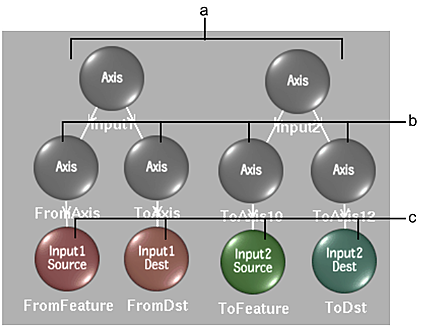
(a) Spline node trees for one Front1 (Input1), and one Front2 (Input2) spline (b) Axis nodes for individual spline wireframes (c) Spline nodes for corresponding source and destination splines