Define Additional User Asset Properties
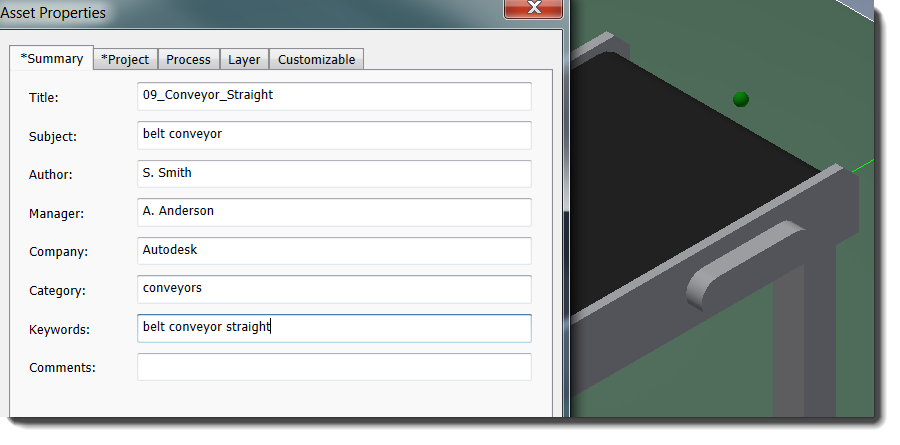
Reorganized and expanded Asset Properties tabs let you predefine asset data used by AutoCAD, Inventor, and Process Analysis.
-
Summary properties provide basic information about the asset and are used to search for the asset in the Asset Browser.
-
Project properties define data that is useful for project reporting and preparing a bill of materials. Fields include Part Number, Stock Number, Cost Center, Vendor, and Estimated Cost.
-
Process properties tie simulation data to an asset, making it faster and easier to set up simulation scenarios in Process Analysis.
-
Layer properties predefine the placement layer for an asset, further automating your CAD standards.
-
Customizable properties now include a category option to help you organize information for reporting. These categories also appear in the Factory Properties browser.
- Descriptor properties (available in AutoCAD Factory only) let you add descriptive information to an asset that displays with the placed asset and in the Factory Properties browser. This feature is similar to Inventor's existing Descriptor command.
All of these properties are optional. Although they are not available for system assets, you can copy a system asset into your User Assets folder to take advantage of these new features.
Related Help topics:
AutoCAD Factory: Assigning Asset Properties
Inventor Factory: Defining Asset Properties
The 2016 Feature Update Pack includes internal productivity enhancements that save previously entered property and category names for easy access when defining custom asset properties.
Change Placed Asset Model Parameters in AutoCAD (available in the 2016 Feature Update Pack)
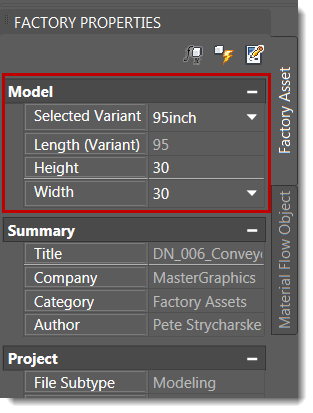
We heard your requests and now support adjustable assets in AutoCAD via the Factory Properties palette. This introduces behavior in AutoCAD that is currently available in Inventor.
To change a model parameter and update the layout, enter the new value in the palette and click the Update icon. This feature also supports asset variants and multi-selecting assets for editing.
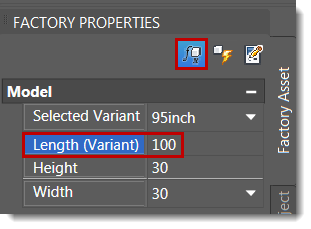
A new Enable Variant Controlled Parameters icon at the top of the palette lets you add a new value for a defined variant.
Related Help topics:
AutoCAD Factory: Modifying Properties Using the Factory Properties Browser
Export Asset Properties
The new Export Properties option generates an Excel spreadsheet listing the assets in the active layout and their associated properties. This export feature provides an easy way for you to share asset data with other systems you use. To access this feature in AutoCAD, click the Factory Assets panel drop-down menu. To access it in Inventor, click the Factory Components panel drop-down menu.
Related Help topics:
AutoCAD Factory: Exporting Asset Properties
Inventor Factory: Exporting Asset Properties