We know that speed and efficiency are important when creating assets and factory designs. In this release, we've focused on improving performance in these areas:
- Faster publishing times for large assembly files.
- Quicker response when placing the first asset or a large assembly in a layout.
- Greater efficiency and speed when synching to Navisworks from AutoCAD.
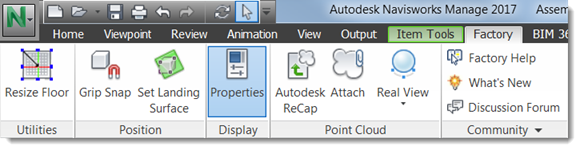
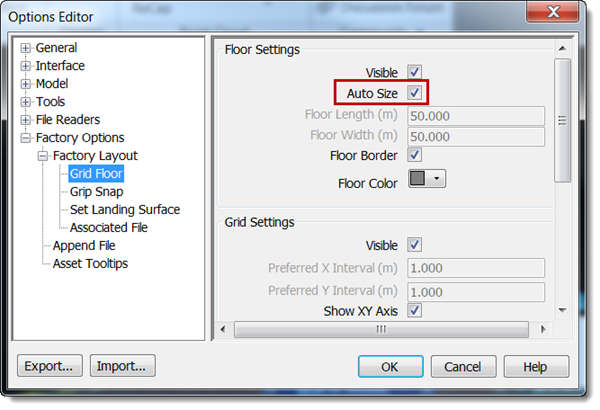
- Better grid displays when viewing large files in Navisworks. To take advantage of this improvement, you must select the
Auto Size option in
Factory Options > Factory Layout > Grid Floor. If Auto Size is selected, the X and Y interval options are disabled.
Easily Create an Associative 3D Representation of Your 2D Model Through Navisworks (available in Factory Design Utilities 2017 R2)
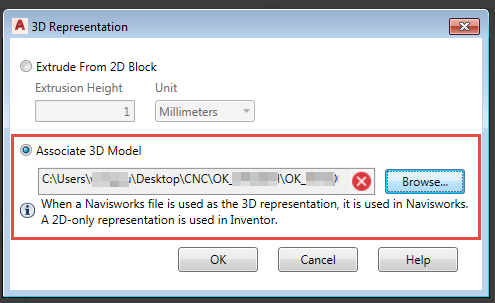
Streamline your workflow for 2D assets that have a Navisworks 3D representation. In the 3D Representation dialog, under the Associate 3D Model option, you can now select a Navisworks NWD file as a 3D representation. By selecting an NWD file, your 3D model is available in Navisworks, while its 2D-only representation is used in Inventor. This new option lets you easily send your Navisworks 3D representation to collaborators.
Related help topics:
AutoCAD Factory: Creating a 3D Representation from a 2D Asset
Improved Workflow to Sync Your AutoCAD 2D Layout to Inventor 3D
Quickly get back to work in your AutoCAD DWG file after selecting Sync Inventor and Return in AutoCAD.
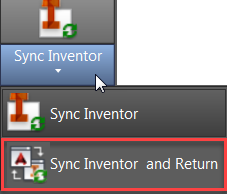
On the AutoCAD Factory ribbon, when you select the new Sync Inventor and Return option, your AutoCAD 2D drawing syncs to either create or update your Inventor 3D model. The Inventor 3D model then closes after the sync is complete. The AutoCAD 2D drawing remains open and remembers where you left off. This new feature allows you to sync your data to Inventor, but then get back to work in AutoCAD with less wait time.
Related help topics:
Inventor Factory: Sharing Assets Between AutoCAD and Inventor
AutoCAD Factory: Initiating Sync Workflows with Inventor and Navisworks
Ribbon Updates
- Moving Inventor Factory
Insert Model, which inserts existing sub-layouts into a layout, to the Layout menu with other sublayout commands.
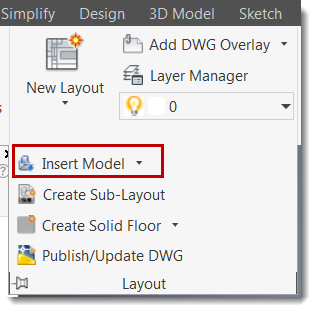
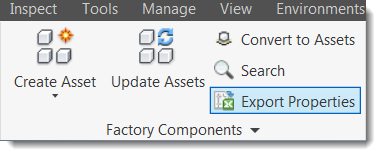
- Moving the Inventor Factory
Export Properties command to the main ribbon for easy access.
- Replacing Quick Properties in the Navisworks Factory ribbon with a
Properties command. Click this command to view Item, Project, TimeLiner, and Summary information for the selected asset.