In this task, you use deflection results to determine what was the cause of the warpage.
 Download the files for this tutorial from
Autodesk Knowledge Network-New User Quick Start tutorial.
Download the files for this tutorial from
Autodesk Knowledge Network-New User Quick Start tutorial.
The warpage analysis was run with the Isolate cause of warpage option that incorporates different variants as inputs to investigate the cause of warpage. These variants include:
-
Differential cooling
-
Differential shrinkage
-
Orientation effects
-
All effects - the combined deflection from the individual warpage causes.
These plots may help determine the cause of warpage.
- Navigate to where you have saved the tutorial files and import MouseCover_warpage.sdy.
-
Double click
 ().
().
-
Click
When you rotate, pan and zoom, all four windows move at the same time. ().
().
-
Display the different deflection results. Start in the upper left window and go clockwise plotting:
-
Deflection, all effects:Deflection
-
Deflection, differential cooling:Deflection
-
Deflection, differential shrinkage:Deflection
-
Deflection, orientation effects:Deflection
-
-
Compare the maximum deflection for each cause of warpage.
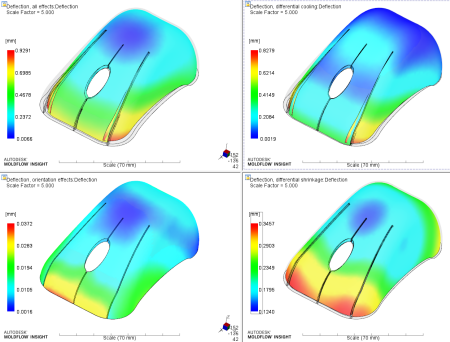
Orientation effect has minimal impact on the warpage. Differential cooling causes the outer corner to bow inwards, while differential shrinkage causes the front edge of the body to bow inward.
The sum of the differential cooling and the differential shrinkage exceeds the magnitude of the Deflection, all effects result. Differential cooling and Differential shrinkage partially cancel each other out giving the smaller than expected Deflection, all effects result. Both Differential cooling and Differential shrinkage will need to be addressed for a good part to be produced.