Collapse Controller
The Collapse Controller tool allows you to convert procedural animation tracks into tracks with keyframes. Procedural track types include Expression, a wired parameter, Noise controller, or even something like a List controller.
- Track View > Edit menu > Controller submenu > Collapse
You can also use this tool to convert any controller track to a simple keyframed track. You can convert Rotation tracks to either Euler or TCB, and collapse Position and Scale tracks to either Bezier or Linear controllers.
You can collapse an entire track, or collapse a range of frames within a track by setting the Start Frame and End Frame values. The Samples parameter lets you define how many frames will be placed between keys.
Collapse Controller can be used to collapse any number of selected tracks at once.
This functionality is similar to the Collapse button found in the Collapse Transform group of the Motion panel > Trajectories rollout.
Procedures
To collapse a procedural controller track:
In a viewport, select an object with a procedural controller, then right-click and choose Curve Editor from the quad menu.
The Track View - Curve Editor is displayed.
In the Curve Editor's Controller window, click the track to collapse. Then choose Edit menu > Controller submenu > Collapse Controller from the Track View menu.
The Collapse Controller dialog opens
Change the Samples value to specify the number of frames between keys.
The default value of 1.0 creates a key at every frame, which might be more than you want to work with. Instead, try 5.0 or so.
Choose the type of controller that you want the keys to use after collapsing.
Position and Scale tracks collapse to either Bezier or Linear. Rotation tracks collapse to either Euler or TCB.
Note: TCB controllers do not display function curves.Click OK.
The Key window displays the curves for the collapsed animation. The track bar displays the keys, as does the Track View – Dope Sheet.
Tip: If you want to collapse the controller into a weighted List controller, turn on Add To New Layer. The original controller will be stored on a layer with a weight of 0.0. At this setting it has no effect, but is available for future use, if need be.
Interface
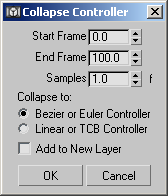
Start Frame
The first frame of the range of animation to be collapsed. Default=The first frame of the original controller's active range.
End Frame
The last frame of the range of animation to be collapsed. Default=The last frame of the original controller's active range.
Samples
The granularity of the collapse operation. This value defines the number of frames between keys. Default=1.0.
Collapse to
Choose the type of controller the procedural track will become:
Bezier or Euler Controller Position, Scale, and scalar parameter tracks are assigned Bezier controllers; Rotation tracks are assigned Euler controllers.
Linear or TCB Controller Position, Scale, and scalar parameter tracks are assigned Linear controllers; Rotation tracks are assigned TCB controllers.
Note: TCB controllers do not display function curves.
Add to New Layer
When this is turned on, the collapsed controller is added as a new layer in a weighted List controller. Default=off.
This option is useful because it keeps the old controller on another layer with a weight of 0.0. This lets you restore the original animation easily if necessary.