Array Modifier Randomization Rollout
 Modify panel > Make a selection > Modifier List > Object-Space Modifiers > Array > Randomization rollout
- Default menu: Make a selection > Modifiers menu > Parametric Deformers > Array > Randomization rollout
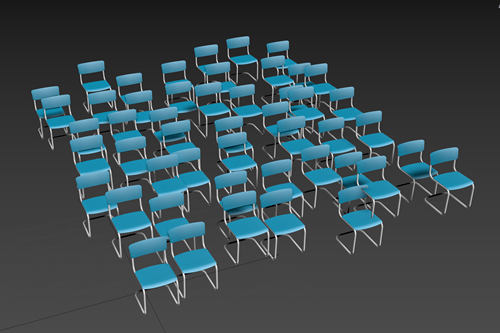
The Array modifier's Randomization rollout provides controls to adjust the position, rotation, and scale, and apply the adjustments to a percentage of the clones in the array. In the following example, the Grid Distribution method has been used to create a grid of chairs, which has been randomized using the Position parameters.
Interface
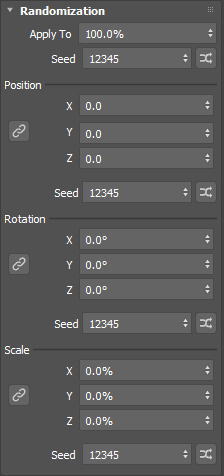
Apply To
Sets the percentage of clones that are affected by the randomizations. The default is 100%.
Seed
Sets a random number seed for the Apply To value.
Position X, Y, Z
Moves the affected clones along the X, Y, or Z axis a random amount between 0.0 and +- the specified value. This value is measured in display units.
Seed
Sets the random number seed for the position value.
Seed Randomization
Click  to randomize the seed value.
Position Link (  )
)
When enabled, the X axis parameter controls all three axes, making it easier to translate the clones proportionally.
Rotation X, Y, Z
Rotates the affected clones about the X, Y, or Z axis a random amount between 0.0 and +- up to the specified value. This value is measured in degrees.
Seed
Sets the random number seed for the rotation value.
Seed Randomization
Click to randomize the seed value.
Rotation Link ( )
When enabled, the X axis parameter controls all three axes, making it easier to rotate the clones proportionally.
Scale X, Y, Z
Scales the affected clones along the X, Y, or Z axis a random amount between 0.0 and +- up to the specified value. This value is measured in display units.
Seed
Sets the random number seed for the scale value.
Seed Randomization
Click to randomize the seed value.
Scale Link ( )
When enabled, the X axis parameter controls all three axes, making it easier to scale the clones proportionally.