Section Type Rollout (Sweep Modifier)
The Section Type rollout lets you choose either a built-in, stock section or a section based on a custom shape.
 Modify panel > Select a 2D shape. > Modifier List > Sweep > Section Type rollout
- Default menu: Select a 2D shape. > Modifiers menu > Patch/Spline Editing > Sweep > Modify panel > Section Type rollout
- Alt menu: Select a 2D shape. > Modifiers menu > Spline > Sweep > Modify panel > Section Type rollout
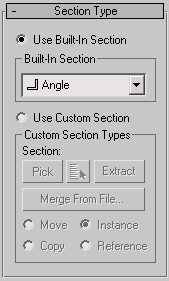
Use Built-In Section
Choose this to use one of the included stock sections.
Built-In Section group
Built-In Section list
Clicking the arrow button for this list displays common structural sections.
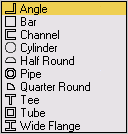
 Angle section Sweeps a structural angle section along the spline. Default section=Angle.
 Bar section Sweeps a 2D rectangular section along the spline.
 Channel section Sweeps a structural channel section along the spline.
 Cylinder section Sweeps a solid 2D circle section along the spline.
 Half Round section This section produces a half round extrusion along the spline.
 Pipe section Sweeps a circular hollow tube section along the spline.
 Quarter Round section Useful for molding details; this section produces a quarter round extrusion along the spline.
 Tee section Sweeps a structural tee section along the spline.
 Tube section Based on a square, this sweeps a hollow tube section along the spline. Similar to the Pipe section.
 Wide Flange section Sweeps a structural wide flange section along the spline.
Use Custom Section
Choose this if you've created your own section or there is another shape in the current scene or in another MAX file that you'd like to use as your section.
Custom Section Types group
Section
Displays the name of the custom shape you've selected. This area is blank until you select a custom shape.
Pick
If the custom shape you want to use is visible in the viewport, click the Pick button and then pick the shape directly from the scene.
Pick Shape
Click to select a custom shape by name. This dialog shows only valid shapes that are currently in the scene; its controls are like the Scene Explorer controls.
Extract
Lets you create a new shape in the scene that is either a copy, instance, or reference of the current custom section. Opens the Extract Shape dialog.
Merge From File
Lets you choose a section that is stored in another MAX file. Opens the Merge File dialog.
Move
Sweeps the custom section along the specified spline. Unlike the Instance, Copy and Reference switches, the selected section is moved to the spline. Editing the original shape in the viewports has no effect on the Sweep mesh.
Copy
Sweeps a copy of the selected section along the specified spline.
Instance
Sweeps an instance of the selected section to the specified spline.
Reference
Sweeps a reference of the selected section along the specified spline.