Project management improvements in this release include:
- Validating duplicate tags for both P&ID and 3D piping
- Validating 3D model to P&ID checks for drawings
- Performance improvements for project validation
- Combining multiple audit sessions into a single session
- Auditing duplicate tags for line group data types
Validate Duplicate Tags
Validation has been extended to detect duplicate tags in both P&ID and 3D piping drawings.
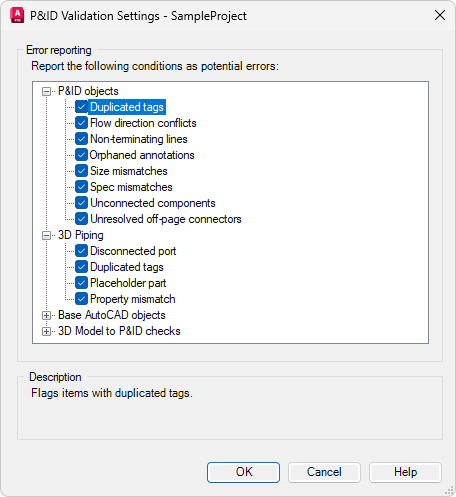
A new Duplicated Tags validation option is available for both P&ID Objects and 3D Piping in the P&ID Validation Settings dialog box.
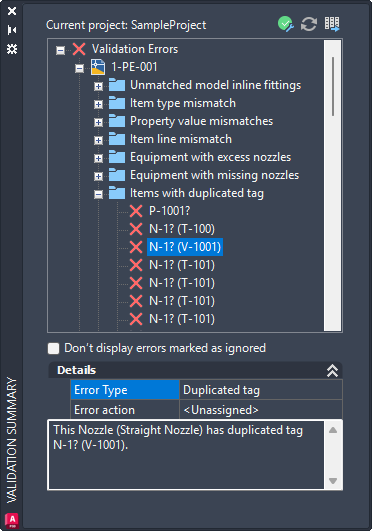
When duplicate tags are detected, detailed errors are listed under the Items with Duplicate Tags node in the Validation Summary window.
- For new projects, the Duplicated Tags option is enabled by default. For existing projects, the option is disabled by default.
- For Collaboration projects, after modifying settings in the P&ID Validation Settings dialog box, you must check out and then check in Project Setup. This ensures that the updated validation settings are properly synchronized to the cloud.
Validate 3D Model to P&ID Checks for Drawings
In addition to project validation, 3D model to P&ID checks can now be performed when validating drawings. Validation errors resulting from these checks are displayed in the Validation Summary window when one or more drawings are validated.
When validating P&ID drawings, the corresponding 3D models can also be validated to identify inconsistencies. Likewise, when validating 3D models, the associated P&ID drawings are included in the validation process.
Validation Performance Improvements
Validation now performs more efficiently for rules that don't require drawings to be opened. In these cases, validation can be performed directly against the project database, eliminating the need to open drawing files.
Audit for Duplicate Tags
Project Audit can now detect and resolve duplicate tag values stored in the project database for the following line group data types:
- PipeLineGroups
- SignalLineGroups
- P3dLineGroups
When duplicate tags are detected, a question mark (?) is appended to the duplicate tag value to ensure uniqueness.
If a tag contains a question mark but is no longer duplicated, the question mark is automatically removed.
Combine Multiple Audit Sessions
The Project Audit process has been streamlined to reduce the need for repeated audit operations. Multiple audit sessions are now consolidated into a single audit session.
Duplicate Tag Check for Collaboration Projects
Duplicate tags can now be checked against the cloud when assigning tags in Collaboration projects. This helps identify conflicts earlier and reduces the likelihood of duplicate tags being introduced before drawings are checked in.
When a tag is confirmed, it is reserved in the cloud, preventing other users from assigning the same tag until the changes are committed.
A new system variable, PLANTCOLLABORATIONONLINE, controls whether duplicate tags and auto-generated tag values are validated and synchronized with the cloud in Collaboration projects.
- Assign Tag Dialog Box
-
When duplicate tag checking is enabled and a matching tag already exists in the cloud, an error message is displayed immediately, prompting you to enter a unique tag.
- Auto-Generated Tag Synchronization
-
When enabled, auto-generated tag values are retrieved from the cloud, helping ensure consistent tag numbering across multiple users working in the same Collaboration project.