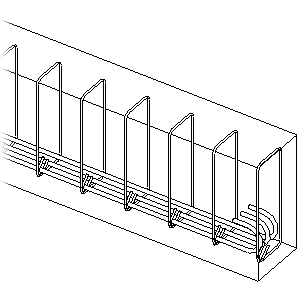
Place predefined rebar shapes or sketch custom rebar to reinforce your concrete modeling elements.
Concrete tab Reinforcement panel (Rebar)
Concrete tab Reinforcement panel (Path)
Concrete tab Reinforcement panel (Morphed)
Topics in this section
About Reinforcement
Use reinforcing tools to add reinforcement elements, such as rebar, reinforcing bars, or fabric, to valid hosts, such as a concrete beam, column, structural floor, or foundation.
About Reinforcing Concrete Parts
Concrete parts created from surface elements (such as walls and floors) possess rebar cover and can host rebar, rebar sets, area reinforcement, path reinforcement, and fabric reinforcement.
General Reinforcement Settings
Specify settings to shape match by referencing hooks and to display independent rebar elements in area and path reinforcement.
Place Rebar
Place individual rebar instances in valid hosts.
Sketch Planar Rebar
Use common sketch tools for manual placement of rebar shapes within a valid host.
Sketch Multi-planar Rebar
Use common sketch tools to define rebar shapes that are bent in two planes.
Create Standard 3D Rebar Shapes by Rotating Hooks and Cranks
Place rebar with 3D rotated hooks or cranks or rotate the hooks or cranks of existing bars. When you rotate the hooks or cranks at the ends of rebar, a 3D rebar shape is created, if the bar, hook and crank segments are no longer in the same plane.
Free Form Rebar
Learn how to place rebar and rebar sets in concrete modeling elements with complex geometry.
Path Free Form Rebar
Learn how to create free form rebar with planar bars, distributed along a distribution path.
Morphed Free Form Rebar
Learn how to place and manage morphed rebar driven distribution and free form rebar surface distribution.
Propagate Rebar
Copy and adapt shape driven and free form rebar from the source host to destination hosts. The bars are adapted by matching the rebar constraints.
Rebar Instance Properties
View and modify the parameters that define the instance properties of rebar.
Rebar Type Properties
View and modify the parameters that define the type properties of rebar elements.
Rebar Shape Constraints and Cover
Rebar constraints set and lock the geometry of each rebar instance with respect to a concrete host element. Rebar cover is the internal offset of a concrete host to which rebar parametrically extends.
Rebar Numbering for Schedules and Annotation
Reinforcement elements are numbered on placement or modification, if there are active numbering templates in the project. Numbering allows identical reinforcement elements, within the same partition, to be matched for schedules and tags.
Splice Rebar
Splice one or several rebar sets at the selected position or by length.
Adjust the Visibility for Rebar and Rebar Couplers in a View
Rebar elements in a model are contained within host elements. In hidden line view they are obscured by the host. You can set overrides for each view in a project, so the rebar design can be documented.
Define and Add a Rebar Crank
For existing rebar in the project or during rebar placement, you can assign cranks to bar ends or change to a rebar shape that has a crank already assigned.