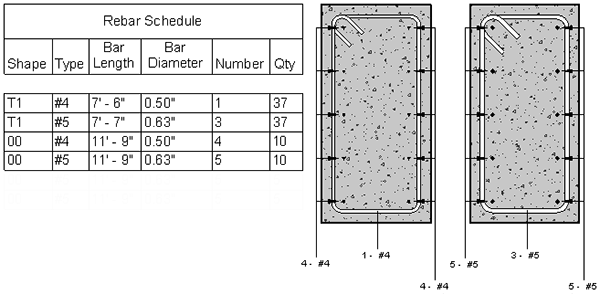
Reinforcement elements are numbered on placement or modification, if there are active numbering templates in the project. Numbering allows identical reinforcement elements, within the same partition, to be matched for schedules and tags.
Projects containing rebar types automatically include templates for rebar, couplers, and fabric sheets. Default matching settings can be combined with parametric matching, and the Rebar Number is editable. By default, partitions are based on the Partition parameter, but you can switch to another parameter such as Host Category.
- Open the auto ‑generated templates for rebar, couplers, or fabric sheets and review their filters.
- Adjust matching behavior (combine default matching with parametric rules as needed).
- Edit Rebar Number where necessary to resolve field issues.
- Confirm the partition parameter (default Partition) or change to a more suitable parameter (e.g., Host Category).
In assigned partitions, the rebar, fabric sheet, and rebar coupler numbers match those of the same type, size, material, and shape. The tags in the following section view show this number matching relationship.
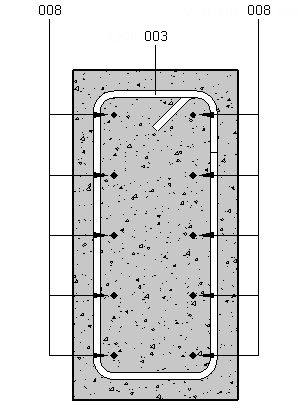
The number for a rebar element may be viewed and overridden in the Properties palette. You can edit the numbering template for rebar, fabric sheets, and rebar couplers in the project.
You can schedule, count, and tag rebar numbers.