View and modify the parameters that define the instance properties of rebar.
To change instance properties, select the element and change its properties on the Properties palette.
| Name | Description |
|---|---|
| Construction | |
| Partition | Specifies the partition in which the rebar is associated. To change a partition, select from the drop-down list or enter a new partition name. See About Rebar Partitioning. |
| Rebar Number | Specifies the number assigned to the selected rebar and to any rebar element of the same type, size, shape, and partition. You can edit the value to override it for all identical elements and swap the numbers if the value you input is already assigned. See Rebar Numbering. |
| Schedule Mark | Specifies rebar instances with a rebar schedule mark. The mark improves scheduling and organization. |
| Geometry |
Specifies the geometry of the rebar as it was placed in the host. This read-only property displays either Shape Driven or Free Form. |
| Bar Alignment | Specifies how the bars in the set are aligned.
Note: Applies for Path Free Form Rebar only.
|
| Style | Specifies the bend radii control, either Standard or Stirrup/Tie. See Rebar Type Properties. |
| Stirrup/Tie Attachment | Specifies the stirrup/tie rebar to snap to the interior (default) or the exterior side of the rebar cover reference of the host. Either Interior Face of Cover Reference or Exterior Face of Cover Reference (read only). |
| Base Finishing Turn | Spiral rebar only. Specifies the number of complete coils to close the spiral base.
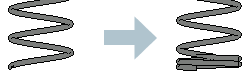 |
| Top Finishing Turn | Spiral rebar only. Specifies the number of complete coils to close the spiral top.
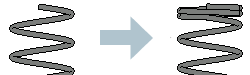 |
| Height | Spiral rebar only. Specifies the total height of the spiral rebar. |
| Pitch | Spiral rebar only. Specifies the distance between rebar coils in the spiral.
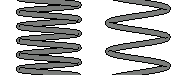 |
| Shape | Specifies the identification number of the rebar shape. |
| Shape Name | Specifies a custom identification number for the rebar shape. Edit the rebar shape family to customize the value of the rebar shape name. |
| Start of Bar | Specifies if the start of the rebar instance should have a hook, an end treatment, or a crank. |
| Hook at Start | Lists appropriate rebar hook types for the selected style. |
| Crank at Start | Specifies the crank type applied to the start of the rebar instance. |
| Rotation at Start | Specifies the rotation of the hook or the crank at the start of the rebar instance. A negative value will flip the bar end orientation. See Create Standard 3D Rebar Shapes by Rotating Hooks and Cranks. |
| End Treatment at Start | Specifies the end treatment type applied at the beginning of the rebar instance for use with rebar couplers. See About Reinforcement End Treatments. |
| End of Bar | Specifies if the end of the rebar instance should have a hook, an end treatment or a crank. |
| Hook at End | Lists appropriate rebar hook types for the selected style. |
| Crank at End | Specifies the crank type applied to the end of the rebar instance. |
| Rotation at End | Specifies the rotation of the hook or the crank at the end of the rebar instance. A negative value will flip the bar end orientation. See Create Standard 3D Rebar Shapes by Rotating Hooks and Cranks |
| End Treatment at End | Specifies the end treatment type applied at the end of the rebar instance for use with rebar couplers. See About Reinforcement End Treatments.. |
| Rebar Set | |
| Layout Rule | Specifies the type of rebar layout. See Rebar Set Layouts. |
| Layout Formula | Specifies the formula for distributing bars in the set. You can use a combination of numbers, lengths or length percentages and spacings. Use "?" to distribute bars at exact spacing with a remainder and ";" as the separator.
Note: It is displayed only for the Custom Spacing layout.
|
| Distribution Length | Reports the length of the distribution path for the rebar set. Fixed-layout free form rebar distributions may not cover the entire length.
Note: It is displayed only for the Custom Spacing layout.
|
| Path Start Offset | Specifies the start offset of the distribution path. Negative offsets shorten the path; positive ones lengthen it. The offset is measured from the constraint target set during placement or modified in Edit Constraints.
Note: It is displayed only for the path shape distribution.
|
| Path End Offset | Specifies the end offset of the distribution path. Negative offsets shorten the path; positive ones lengthen it. The offset is measured from the constraint target set during placement or modified in Edit Constraints.
Note: It is displayed only for the path shape distribution.
|
| Quantity | Specifies the number of rebar instances within the rebar set. This parameter is only accessible when the Fixed Number or Number with Spacing Layout Rule is selected. |
| Spacing | Specifies the spacing for the rebar placed within the rebar set. This parameter is not accessible when the Single or Fixed Number Layout Rules are selected. |
| Graphics | |
| View Visibility States | Accesses rebar view visibility states. Click Edit to either view or edit the state. See Adjust the Visibility for Rebar in a View. |
| Structural | |
| Reinforcement Volume | Displays the calculated estimate for reinforcement volume (read-only). |
| Reinforcement Mass | Specifies the reinforcement mass and is calculated as Total Bar Length * Bar Mass per Unit Length. |
| Dimensions | |
| Bar Length | Displays the length of an individual rebar (read-only).
Note: If you use reinforcement rounding in the project, this dimension displays in a dual format: exact and rounded in brackets. See
Rebar Numbering.
|
| Total Bar Length | Displays the total length of all rebars in a set (read-only).
Note: If you use reinforcement rounding in the project, this dimension displays only as a rounded value. See
Rebar Numbering.
|
| A, B, C, ... | Specifies the length of each segment in the rebar shape.
Note: If you use reinforcement rounding in the project, these dimensions display in a dual format: exact and rounded in brackets. You can edit only exact values. See
Reinforcement Rounding.
|
| Rounding Overrides | Specifies the rounding parameters for the selected bar instance. This overrides the rounding parameters defined in the
Rebar Type Properties dialog.
Note: This parameter is available only if
reinforcement rounding was specified in the project.
|
| Override Hook Lengths | Check the box in the properties palette (or in a rebar schedule) to directly edit the lengths of hooks for each rebar instance. This is applicable for any rebar with hooks and requires that the hook lengths be assigned to a rebar shape parameter. See Create Standard 3D Rebar Shapes by Rotating Hooks and Cranks |
| Override Crank Lengths | Check the box in the properties palette (or in a rebar schedule) to directly edit the lengths of cranks for each rebar instance. This is applicable for any rebar with cranks and requires that the crank lengths be assigned to a rebar shape parameter. See Rebar Crank Length Parameters. |
| Identity Data | |
| Comments | General comments about the rebar instance. You can include this information in a schedule. |
| Mark | An instance-specific label used, for example, as a shop mark. This value must be unique for each element in a project. Revit warns you if the value is in use, but allows you to continue using it. You can see the warning using the Review Warnings command. See Reviewing Warning Messages. |
| Host Category | Specifies the current host associated with the reinforcement elements: Structural Column, Structural Framing, Structural Foundation, Wall, Floor, or Part. |
| Host Mark | Specifies the Mark parameter of the rebar host. |
| Phasing | |
| Phase Created | This read-only field indicates the creation phase of the host element. See Project Phasing. |
| Phase Demolished | This read-only field indicates the demolition phase of the host element. See Project Phasing. |