3+2 Roughing strategy
This feature is part of an extension. Extensions are a flexible way to access additional capabilities in Fusion. Learn more.
The 3+2 Roughing strategy (previously known as 3+2 Clearing) removes stock from multiple fixed 3+2 orientations in a single toolpath. You can reach overhanging regions and areas where the tool holder would otherwise block access. This reduces setup and programming effort compared to programming each machining direction individually.
The tool positions the rotary axes to specific angles and keeps them locked during cutting moves. This gives you a fixed tool orientation with higher stiffness than 5-axis simultaneous milling. You also gain more control over safe machining around fixtures and holder-limited areas. The strategy generates efficient linking motions between machining directions.
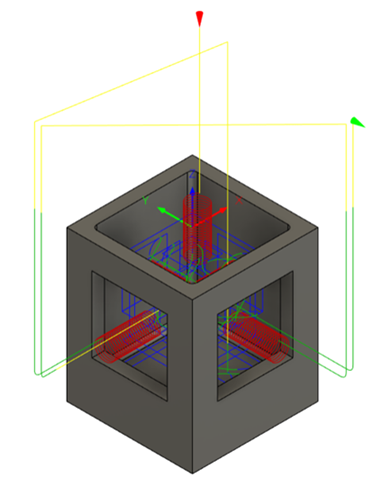
3+2 Roughing in one toolpath removes stock by machining in different directions.
Choice of toolpath style
The 3+2 Roughing strategy supports three roughing styles:
- Offset Roughing (previously known as Pocket) — Offset-style roughing, similar to the Scallop strategy. Useful for large parts with complex geometry when machining with indexable insert tools and high-feed cutters. These tools often have larger diameters that allow larger stepovers.
- Parallel — Raster-style roughing with mostly straight-line moves. Useful for large parts with softer stock materials, such as foams and resins. Most efficient when cutting in both directions.
- Adaptive Roughing — Adaptive-style roughing useful for smaller parts with simpler geometry that benefit from larger stepdowns. When you select Adaptive Roughing, you can also use options that help prevent tool damage when machining thin walls.
Tool orientations
To help you specify the most suitable tool orientations for complex parts, the strategy offers a high degree of automation. You can select from three modes of tool axis selection:
- Automatic — Fusion determines tool orientations based on searching criteria. Useful for complex parts. This mode is fully automated but may not produce the most efficient toolpath.
- Semi-automatic — Uses the orientations you specify first, then searches for additional orientations to remove more stock.
- Selection — Uses orientations you specify by selecting faces on the part. Useful for prismatic parts where you can choose effective orientations by inspection.
Machining types
Depending on the capabilities of your machine and part requirements, with the 3+2 Roughing strategy, you can generate 3-axis or 5-axis toolpaths:
- 5-axis — The default option. Cutting moves use 3+2 axes. Linking moves between orientations use simultaneous 5-axis motion, similar to other multi-axis strategies such as Flat and Deburr.
- Polar — The toolpath looks like a 3-axis toolpath, but uses rotations about the machine's rotational axis instead of X and Y motion. Useful when travel in X and Y is limited but the table can rotate about Z to reach more of the part. For more information, see Polar machining.
- 3-axis — Machines areas you define with a machining boundary. Useful when you want to limit the toolpath to specific regions of the part. This mode gives you another roughing option beyond native 3D Offset Roughing and 3D Adaptive Roughing strategies.
Virtual fixture
For 5-axis toolpaths, you can use Virtual Fixture on the Heights tab to limit the toolpath when required. The virtual fixture stops 3+2 orientations from dropping beyond the part, such as when the tool would move more than 90 degrees underneath the part.
The virtual fixture uses a bounding box based on the part geometry. You define the height and lateral extent of the limit. You can offset the box to make it smaller or larger. The tool cannot move through the bounding box, but it can move below the virtual fixture height outside the box, such as when machining from an angle. This differs from Bottom Height, which is a plane that blocks all cutting moves below it.
For example, an offset of -100 mm stops the tool from going under the part. An offset of 0 matches the toolpath to the exact size of the part.