Edit custom property settings
Fusion Manage requires a separate license and can be used with Fusion or independently. Learn more.
 next to the hub name to confirm you're using a collaborative editing hub. Learn about collaborative editing.
Hub administrators can edit a custom property's description, localized names and descriptions, and visibility settings. However, after a property is created, you cannot change the following:
- Property name
- Field type, including the selected currency for Currency fields
- Copy value setting
Open a custom property
Open the Fusion web client.
In the upper-right corner, click your profile, then select Admin > Custom Properties.
(Optional) Use search to find the property.
Click the property row to open its details.
The property side panel opens.
Edit visibility
You can change a property's visibility from either the side panel or the Edit property page.
In the side panel, toggle Visible on or off:
- On: The property appears in the Properties tab and panel, bill of materials (BOM), drawings, and search results.
- Off: The property is hidden from all Fusion views but remains accessible through the API.
Edit descriptions and localized values
You can edit the property description, localized names, and localized descriptions from the Edit property page.
Open the Edit property page from the side panel using either of the following methods:
Click Edit
 next to the description, a localized name, or a localized description.
Click More
 at the top of the side panel, then select Edit property.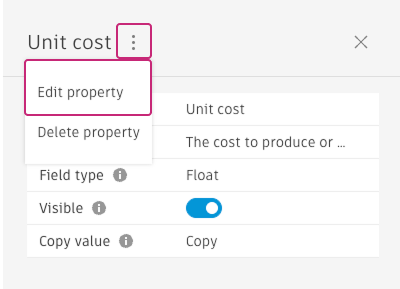
Make your changes. On this page, you can:
- Add to or update the description
- Add, edit, or delete localized names
- Add, edit, or delete localized descriptions
- Toggle visibility on or off
Click Save.