Sheet metal rules library
The Sheet Metal Rules Library lets you select existing sheet metal rules, create custom rules, and manage hub-level standards for your team in Fusion. With each rule, you define thickness, bend and corner behavior, and related parameters that apply when you create sheet metal bodies.
Using the Sheet Metal Rules Library, you can:
Apply the same hub-level standards (thickness, K-factor, bends, and corner reliefs) across projects and users on your hub.
Use names and Description to tell similar rules apart in the library list.
You must be connected to the internet to open and use the shared rules experience. If you create sheet metal designs while offline, the default sheet metal rule is applied to new bodies.
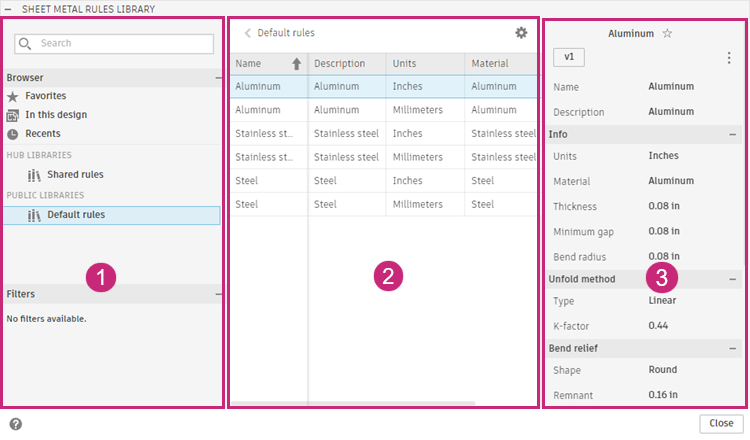
The Sheet Metal Rules Library is divided into three general sections:
- Rule libraries
- Rules list
- Rule details
1. Rule libraries
The library panel organizes rules into folders:
In this design — Rules that apply to the active document. When you assign or create rules in a design, they appear here.
Shared rules — Sheet metal rules stored at the Hub level. Your team creates and maintains them here so everyone on the hub can use the same standards across projects. You can rename the library folder if needed.
Note: The first time you open the library after the shared rules update, rules that were stored only in the design or on your device are migrated into Shared rules.Default rules — Six built-in rules from Fusion that you can't edit. They give you a consistent starting point for thickness, bends, and related settings when you are new to sheet metal or your hub does not yet have any shared rules defined.
Use Search to find a rule by name. Favorites and Recents help you return to rules you use often.
2. Rules list
The middle panel lists rules in the currently selected library folder. The table includes Name, Description, Units, Material, and Thickness so you can compare similar rules before you apply or edit them.
Select a rule to view its parameters in the Rule details panel. A star icon marks the default rule for new sheet metal bodies in the hub.
3. Rule details
The Rule details panel shows the name, description, and parameters for the selected rule, such as material, thickness, minimum gap, and bend radius.
For descriptions of each parameter, see Sheet metal rule reference.