
Retiring versions
To benefit from performance enhancements and new features, older versions of Desktop Connector will be retired. Upgrade to the latest release at your earliest convenience to prevent disruption to your workflows.
Retired versions: 15.3–15.8 and 16.0–16.7.1 are no longer supported.
Learn about the latest release and download it here.
If you're currently using Desktop Connector v15.x: You must first uninstall your current version before installing this update. Follow the steps below to upgrade.
How do I upgrade?
- If you work in an enterprise or managed environment, consult with your IT/CAD Administrator about scheduling an update to the latest version.
- If you are an admin, follow our Admin Deployment Guide.
- Otherwise, follow the steps here: Update Desktop Connector
Will I be notified if I need to upgrade?
Yes, you will receive different notifications depending on what stage of the retirement process you're in. Here is what you can expect:
Retired
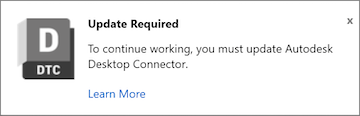
Once your version is retired, you will receive a notification informing you that your version is no longer supported. You will need to upgrade immediately to continue using Desktop Connector.
What happens if I do not upgrade my version of Desktop Connector before it is retired?
Syncing Issues: Desktop Connector will no longer be able to sync files between your local workspace and Autodesk cloud storage (e.g. Autodesk Forma, BIM 360, Fusion, and Autodesk Drive). The Desktop Connector tray icon will indicate that an update is required.

Access Limitations: You can still access and edit your local files, but Desktop Connector will no longer sync with the cloud. However, you can still access your cloud data through the web interface.
Upgrade Notification: The tray icon notification will appear, prompting you to upgrade to the latest version.
Forced Offline Mode (16.x versions): If you're using a version that gets retired, Desktop Connector will automatically put you in offline mode. Once you upgrade to a supported version, you'll need to manually switch back to online mode to start syncing with the cloud again.
Do I need to take any action if I am on release 16.8.0.2169 or newer?
No, you will not be affected. Although we recommend upgrading because the latest release has stability improvements and new features, you are not on a version that is scheduled to be retired.