
• Help Home
    • What's New in this Version
    • Release Notes in this Version
    • Key Concepts
    • Product Licences
    • Getting Started
    • Desktop Analytics
    • Tour of the Workspace
    • Customising ICMLive Operator Client
    • Innovyze Live Server
    • Selecting Network Objects
    • Ground Model
    • Runs, Simulations and Results
    • Data Management
      • System Health Check
      • On-premise and Cloud Databases
      • Options Dialog
        • Options - Units Page
        • Options - General Page
        • Options - GeoPlan Page
        • Options - Local Folders Page
        • Options - ArcGIS Page
          • ArcGIS Login Dialog
      • User Permissions
    • Useful Internet Sites
    • ICMLive Operator Client Feedback
    • Contact Us
    • References
    • Glossary
    • Tech Previews
    Share
    • Email
    • Facebook
    • Twitter
    • LinkedIn


    ArcGIS Login Dialog

    This dialog is displayed when you click Login in the ArcGIS tab in the Options dialog, and is used to sign in to your ArcGIS online account.
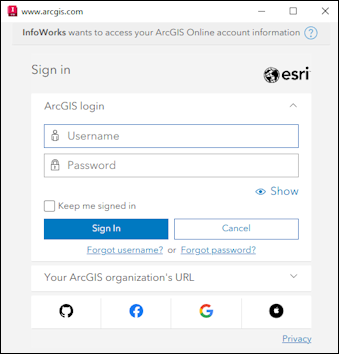
    To sign in:
    • Specify your username and password into the relevant boxes.
    • Click Sign In.

      The dialog closes and a message appears informing you that you are signed in.

    Parent topic: Options - ArcGIS Page

    Was this information helpful?

    Except where otherwise noted, this work is licensed under a Creative Commons Attribution-NonCommercial-ShareAlike 3.0 Unported License. Please see the Autodesk Creative Commons FAQ for more information.

    • Privacy Statement
    • Legal Notices & Trademarks
    • Report Noncompliance
    • © 2025 Autodesk Inc. All rights reserved