
Troubleshooting: VBA Errors
When you try to open a file, the VBA error message displays.
Issue
Inventor is not able to detect VBA (Visual Basic for Applications) on your system. Inventor requires VBA to run properly.
Solution
- Uninstall and then reinstall Inventor
or
Reinstall VBA. In most cases, this issue is resolved by installing or repairing VBA.
To install VBA:
Log on to your computer as Local/Administrator.
On your local drive, navigate to the VBA folder in directory where the downloaded exe file was extracted. For example: ...\3rdParty\x64\VBA
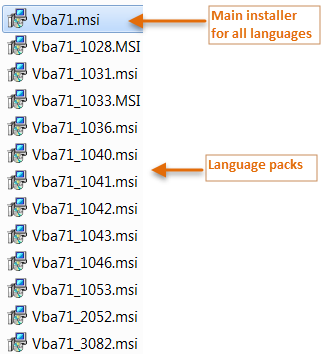
Note: This folder will not be in the Program Files area where the program is installed. It will be where the downloaded exe file was extracted on the local drive.Right-click Vba71.msi and select Uninstall.
Right-click Vba71.msi again and select Install.
Vba71.msi is the main installer for all languages. The other installers are language packs. To identify the appropriate language pack for your language, refer to: https://msdn.microsoft.com/en-us/library/ms912047(v=winembedded.10).aspx If applicable, right-click on the appropriate installer, and select Install.
When the installation is complete, restart Inventor 20XX.