
Catalogs store standard components, which you can select to add to your model or assembly. Product-specific catalogs are supported.
Note: The availability of some product-specific catalogs is license-dependent.
Toolmaker supports mold components from the following catalog suppliers:
|
Crusteel |
Danly |
DME - Europe (both Euro and D-M-E Standards) |
|
DME - North America |
DMS |
Futaba |
|
Hales |
Hasco |
Kishin |
|
LKM |
Meusburger |
MISUMI |
|
PCS |
Pedrotti |
Polimold |
|
Progressive |
Rabourdin |
VAP |
|
Sideco |
Strack |
Unbrako (metric and imperial) |
You can also create custom catalogs to:
- Group together frequently used components. A custom catalog may contain components from several different manufacturers.
- Rename standard components. The underlying geometry of the component and link to the manufacturer is unaffected; the component inherits any change to the manufacturer catalog component.
- Customize components with your own dimensions, order codes and names. These components can then be used in the Component Wizard.
To manage custom catalogs:
- Select Wizard tab > Mode panel > Toolmaker On/Off to run Toolmaker.
- Click Wizard tab > Modify Molds panel > Component Wizard.
- Click Manage custom catalogs to display the options.
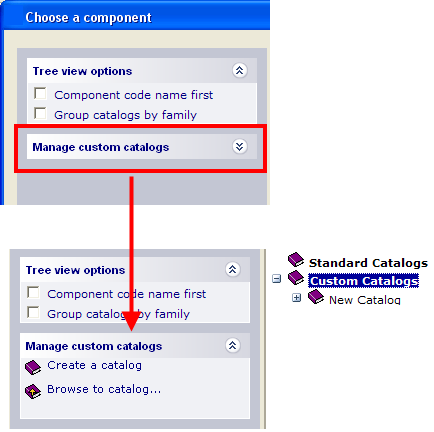
- Use the options to:
- Locate an existing catalog.
- Create a new custom catalog.
Tip: Click  to close the Tree view options on the Component Wizard dialog. This will minimise scrolling.
to close the Tree view options on the Component Wizard dialog. This will minimise scrolling.