
After you click LANGUAGES in the Preferences dialog, you can select the regional parameters and the working language to use.
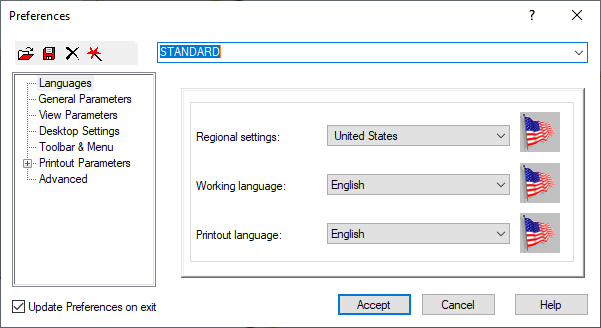
You can select the following:
Regional Settings
Specifies the regional settings for the following countries:
|
|
|
|
|
|
|
|
|
|
|
|
|
|
|
|
|
|
|
|
|
|
|
|
|
|
|
|
|
|
|
|
|
|
|
|
 Great Britain
 United States
 France
 Canada
 Australia
 India
India
 Germany
 Poland
 Italy
Italy
 Spain
Spain
 Russia
 Romania
 Portugal
 Holland
 Belgium
 Brazil
 China
China
 Japan
Japan
 Greece
 Norway
 Denmark
 Finland
 Ukraine
 Thailand.
Regional settings adjust the following parameters to the standards of a country:
- National codes
- Materials
- Regulations.
Working Language
The following working languages are available:
|
|
|
|
|
|
|
|
|
|
|
|
|
|
|
Printout Language
The following printout languages are available:
|
|
|
|
|
|
|
|
|
|
|
|
|
|
|