
Flex tokens in Fusion
Flex tokens, or simply tokens, are a virtual currency you can use to access additional capabilities in Fusion, and other Autodesk products, beyond those included with your subscription. You can also use tokens for prepaid access to Autodesk products, through Autodesk Flex, as an alternative to purchasing a subscription.
Use tokens in Fusion
Use tokens in Fusion to access Autodesk Assistant agentic capabilities, cloud computational services, and Fusion extensions. When you use a service, or access an extension, the number of tokens needed is displayed in Fusion. To understand costs in tokens for services and extensions, refer to the Flex Rate Sheet.
Autodesk Assistant agentic capabilities
Starting September 30, 2026, monthly Flex tokens (beta) will begin rolling out to Fusion subscribers, with tokens included for each seat. Monthly Flex tokens (beta) refresh each month and are used by Autodesk Assistant when it performs tasks for you in Fusion.
Use Flex tokens to access Autodesk Assistant agentic capabilities when the included monthly Flex tokens (beta) are used up, such as:
Cloud computational services
Use tokens to access cloud computational services in Fusion, including:
Fusion extensions
You can use tokens to purchase 24-hour access to the Fusion Design Extension and Fusion Manufacturing Extension. Learn more about Fusion extensions.
Manage your tokens
Check your balance
In the top-right corner, on the Application bar, click your profile icon.

Click Preferences.
In the Preferences dialog, in the left pane, click Tokens.
View how many tokens are available to you and choose which account is charged by default.
Purchase tokens
You can purchase tokens using the Purchase Manager in Fusion:
In the top-right corner, on the Application bar, click Extensions
 to open the Purchase Manager.
Select the Flex Tokens tab.
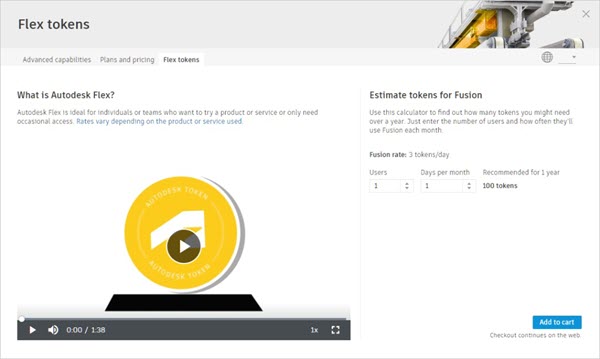
In Estimate Tokens for Fusion, enter the number of Users and Days per Month you expect to use Fusion.
The recommended token amount updates based on your entries.
Click Add to Cart.
A shopping cart is displayed in your default Internet browser.
Follow the on-screen instructions to edit your cart, sign into your Autodesk account, and enter your payment details.
Click Submit Order.
The cost of tokens can vary depending on the local currency and the number of tokens you are purchasing. If you have trouble using or managing your tokens, contact Autodesk Support for help.