
Start Fusion and the Fusion web client for the first time
The two tools you need for working on Fusion projects are:
- The Fusion application: for creating and working on designs and drawings.
- The Fusion web client: for Fusion data management, such as working with permissions, projects, and hubs.
To use either of these, you need to have received an invitation as described in Join a hub. This topic describes how to access and download (if applicable) these tools through your Autodesk account.
Access your Autodesk account
- Navigate to https://manage.autodesk.com.
- Sign in to your Autodesk Account.
- From the menu on the left, select All Products & Services.
Find, install, and start Fusion
In the Products & Services list, find Fusion.

Click Download.
Note: The download should start automatically. A Save As dialog displays and prompt you to save the*.exefile to your computer. In some environments, you may need to use the admin*.exeinstaller.When installation is complete, start Fusion.
Note: If you're doing this for the first time, you may need to sign in to your Autodesk account again.When Fusion opens, in the dialog that asks what's your purpose for using Fusion, choose an option such as Design, Manufacturing, or Electronics.
Complete the dialog, then click Get Started.
Fusion Home opens with the My Fusion page selected. For example:
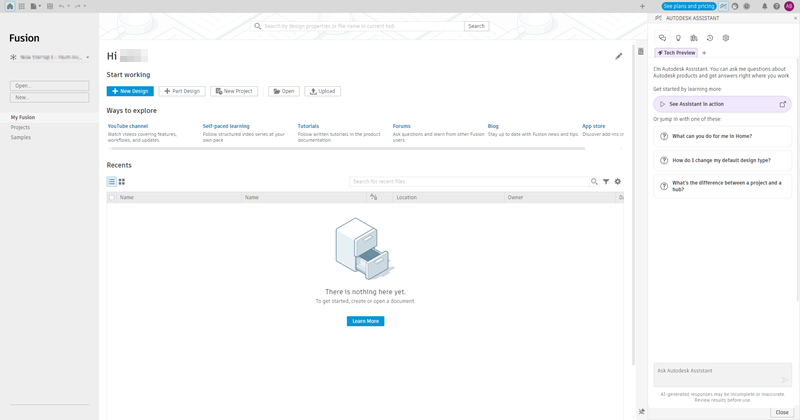 Note: The content and layout of the My Fusion page may vary depending on the type of Fusion access you have.
Use the actions in My Fusion to start a new design, open a file, upload data, create a project, or access learning resources.
Find and open the Fusion web client
In the Autodesk account page, under Products & Services, find Fusion - Contributor.

In the Fusion - Contributor card, click Access to open the Fusion web client.
Alternatively, go to https://www.autodesk.com/fusion-team and sign in.
If this is your first time opening the Fusion web client, you may need to follow prompts to select the hub you will be working in.
Note: If no hubs are available, work with your administrator or Autodesk to get one set up for you.The Fusion web client opens on the projects page.
