
Purchase access to an extension
You can purchase access to extensions directly in Fusion. Purchase options vary by extension and the type of Fusion access you have, but typically include:
- Daily access using Flex tokens.
- Monthly or yearly access using a payment card.
The Purchase Manager shows the price for monthly and yearly options in your local currency. For daily access, it displays the number of Flex tokens required. Check the Flex Rate Sheet to see the equivalent cost in your local currency.
Purchase access in Fusion
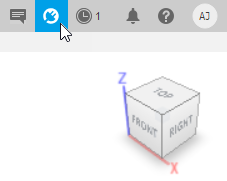
In the top-right corner, on the Application bar, click Extensions
 .
.
The Purchase Manager screen opens.

In the Advanced Capabilities tab, click the extension that you want to purchase access.
In the Overview tab for the extension, under Access Options, select one of the following:
Daily — Pay using Flex tokens.
Monthly or Yearly — Pay using a payment card.
Tip: Check the What’s Included tab to see all added features and where they appear in the Fusion interface.
If you select Daily:
Choose the Account that you want to make the Flex token payment with.
Click Purchase Now.
Tip: If the purchase is unsuccessful, check that you have enough Flex tokens. You can purchase Flex tokens in Fusion, online, or through an Autodesk Service Partner.
If you select Monthly or Yearly:
Click Add to Cart.
A shopping cart is displayed in your default Internet browser.
Follow the on-screen instructions to edit your cart, sign into your Autodesk account, and enter your payment details.
Click Submit Order.
Explore added functionality
To learn more about what the extension includes, go to the What’s Included tab in the Purchase Manager. This tab lists all added features, and selecting a feature shows details about where it appears in the Fusion interface.
After your purchase
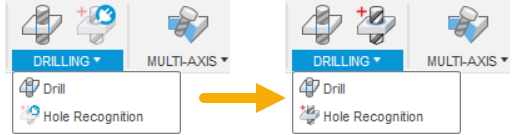
If you purchase access to an extension that adds extra functionality, the extension icons  that appear next to the added features are replaced by their usual icons. For example:
When access to an extension is about to expire, the extensions icon  on the Application bar changes color and a notification is displayed.