Alias represents almost all items in its universe as parts of a hierarchy of objects and groups. Each end block, which represents geometry, is a node, as are all other blocks that make up the hierarchy. Nodes may be combined with other nodes to form more complex objects, and sub-groups can be part of larger subgroups that are, in turn, part of even larger groups of objects. Each node can have additional information associated with it for transformation and animation purposes.
You can see how this hierarchy of objects is represented in the Object Lister and the Scene Block Diagram (SBD) window.
The Object Lister and the SBD window are very useful for selecting data, organizing, grouping, ungrouping, and assigning to layers or assigning shaders.
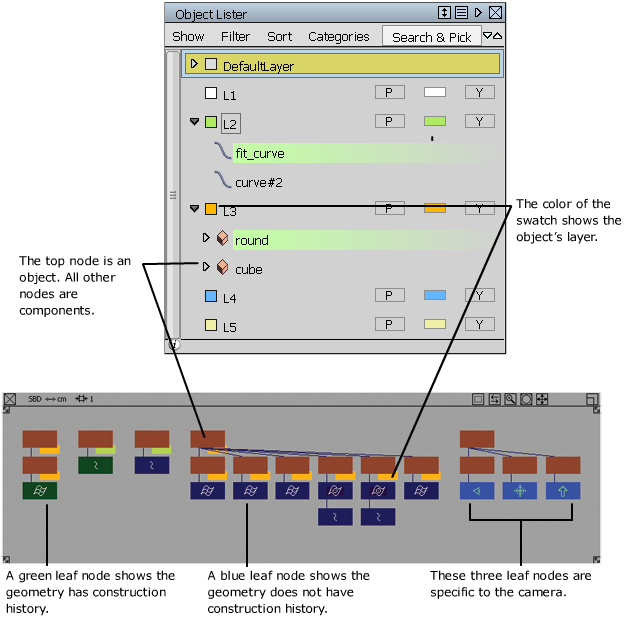
Objects can be organized by layers to help you work more efficiently. Layers can be set to Reference (data is visible but grayed out, and can be snapped to) or Inactive (data is grayed out but cannot be snapped to).
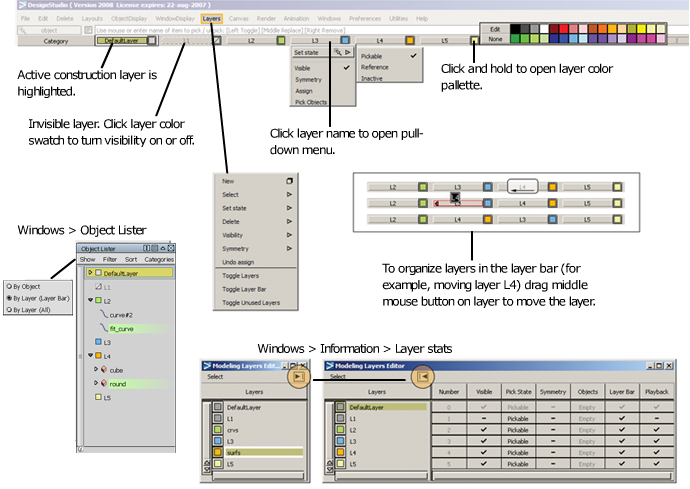
Layer Symmetry enables display of the second half of symmetric models you build. To change the symmetric plane use Layers SymmetrySet Plane. To turn the symmetry into geometry, use LayersSymmetryCreate Geometry. This is useful for creating a complete model for CAD or STL export, for example.