It is common to leverage imported data in part modeling. In some cases, downstream modeling tasks can fail due to poor data quality. To identify solid or surface data that is poor, use the Find Errors command. To perform tolerance based healing, use the Heal Errors command.
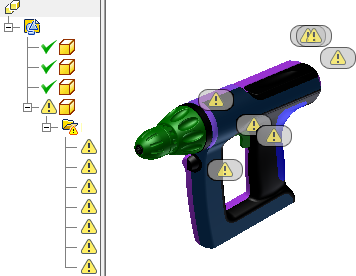
Check data during translation
You can translate data when it opens in Autodesk Inventor. In the Import Options dialog box, specify the data to import (surfaces, solids, or wires). You can specify that the body is imported to the repair environment where you can analyze the data. The find errors analysis in the repair environment shows the type of errors, so you can repair only what you need.
When you translate data, you can select an option to check for errors automatically. This operation has no user input. If the amount of data is large, this task can be lengthy. Clear the check mark to skip the check. You can check and repair the data after import in the repair environment. If you check the data during translation or check the option to import into the repair environment, it is placed in the browser with an icon to indicate the results:
Import into repair environment enabled, information dialog box displays the following on file open.

|
Healthy Geometry |

|
Geometry that requires further checking |

|
Geometry that contains errors and requires repair |
After import, the browser displays an icon next to the imported bodies.

|
Data does not have errors but the body cannot be solidified. This can be caused by gaps in the geometry or reversed loops. |

|
Data needs further evaluation. |

|
Data contains errors. |
If errors are found, use the Repair environment to diagnose, treat and modify imported data.
Check data after translation
Double-click the repair node in the browser to enter the repair environment. You can also right-click the repair node and select Repair Bodies from the context menu. If the Import into Repair Environment option is not checked, you can use the Repair Bodies command in the Surface panel to create a repair body node. Use the Find Errors command to check for errors in topology, geometry, and modeling. The detected errors are listed by type in the browser. You can recheck data after you make repairs.