Look for the
 tag throughout the Maya LT Help to find information on features that are new or updated in Extension 1.
Interoperability with Stingray
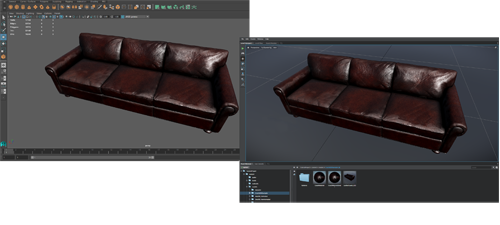
Maya LT 2016 Extension 1 supports powerful connectivity to the new Autodesk Stingray game engine, helping you streamline your 3D asset creation pipeline. Several key workflows let you iterate on your designs and make it easy to see how assets appear in the context of a game.

Visual parity
- Any materials created with the Stingray physically-based nodes in ShaderFX are preserved between Maya LT and Stingray. This means you only need to create materials one time, and your materials created in one tool look the same in the other. See Create a Stingray physically-based shader and Export a physically-based shader.
- The Stingray Tonemap, part of the Color Management system in Maya LT, further ensures the visual parity of 3D assets between Maya LT and Stingray. See Choose the default View Transform and Preview color-managed scenes for more information.
Send assets, connect viewports
Install and load the DCC link plug-in (found in your Stingray install directory) to enable the following in Maya LT 2016 Extension 1:
- Send assets to Stingray
The File > Send to Stingray export options let you export models and animations directly to a Stingray project folder.
- Connect
Maya LT and Stingray viewports
A new Stingray menu lets you synchronize cameras between Maya LT and Stingray so that you can verify how models, animations, and materials appear in Stingray immediately as you work in Maya LT.
For information on finding, installing, and loading the DCC link plug-in, see Enable Stingray and PhysX plug-ins for Maya LT.
Support for PhysX plug-in
Also available with your Stingray install is the NVIDIA PhysX plug-in for Maya LT. For information on installing the plug-in for PhysX, see Enable Stingray and PhysX plug-ins for Maya LT.
When installed and loaded, the PhysX plug-in adds a PhysX menu to the main menu bar in Maya LT, giving you easy access to tools and documentation for creating PhysX ragdolls, rigid bodies, and constraints.
Game Exporter improvements
Updates in the Game Exporter continue to streamline the process of exporting models and animation from Maya LT. New options let you automate more routine tasks during export, such as placing each object into its own file, and moving objects or hierarchies to their origin. In addition, the Anim tab now gives you more room to work with the clip list.
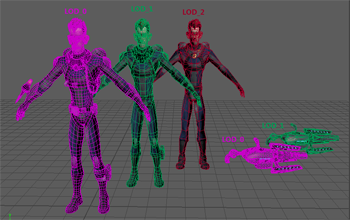
Improved LOD (Level of Detail) workfow
A new
Threshold Type option for LOD groups gives you greater flexibility when exporting LODs to your game engine. Select
Edit > LOD (Level of Detail) > Create LOD Group >
 to set whether the threshold for switching levels is based on
Distance or
Screen Height Percentage. The setting you choose when creating the LOD group is preserved in your FBX file when you export a selected group.
to set whether the threshold for switching levels is based on
Distance or
Screen Height Percentage. The setting you choose when creating the LOD group is preserved in your FBX file when you export a selected group.
Edit animation on layers
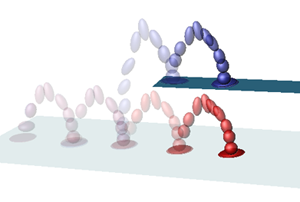
In keeping with our guiding principal to keep things simple, we've added basic animation layer support in Maya LT. The Animation Layer Editor lets you work with two separate layers of animation in your Maya LT scene, on top of any BaseAnimation. This can be particularly useful for editing imported mocap or other animation data that you want to tweak. For example, import a walk cycle as an FBX file, create layers to modify the animation, then merge the layers when you're happy with your changes.
Improved retargeting with HumanIK
You can now bake retargeted animation to the Control rig of the target character, which makes it easier to work with motion capture data applied your character. With animation on the Control rig, you can continue to edit and refine the mocap animation after retargeting. See Bake retargeted animation to the target character and Bake options in the Character Controls.
In addition, we've updated the Character Controls tool to make it easier to access more HumanIK parameters. Refer to the following updated topics for more information.
Higher quality light and shadows with physically-based Area lights
Area lights are now available from the Create > Lights submenu, giving you more control when simulating direct light sources such as light bulbs in an interior scene.

Better skeleton building
Connect Joint and Disconnect Joint options are now available in the Skeleton menu (Rigging menu set), making it easier to develop a character's skeleton by combining and reparenting joint chains, without needing to bind and unbind the skin as you make changes.
Substitute geometry
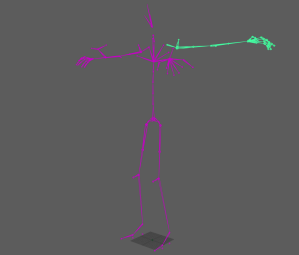
If you do find that you need to swap a piece of bound geometry with unbound geometry, you can now use Skin > Substitute Geometry to swap meshes and transfer smooth skin weights. This is particularly useful when you have multiple players on a small team who need to work on the same character at the same time, when you want to continue iterating on the model without holding up animation, but you don't have time to redo the character's skin weight multiple times.
Image sequence support for File textures
You can use movie files or a sequence of image files to create an animated file texture, which makes it easy to visualize pre-rendered game effects or rotoscope animations.
FBX Version 2016.1
This Extension release for Maya LT picks up the latest version of FBX (2016.1), which provides various bug fixes, in addition to providing support for the new LOD improvements.