Learn about the suite of drainage analysis tools for Civil 3D.
Autodesk Drainage Tools for Civil 3D are now included and installed with Civil 3D 2026.2. This is a production-ready tool set designed to integrate the drainage design environment of Civil 3D with analysis capabilities powered by InfoDrainage analysis cloud-services—all without leaving Civil 3D! This enhances drainage design capabilities by providing new workflows for the design of ponds, underground storage devices, and open channels, as well as improved catchments with expanded runoff method support.
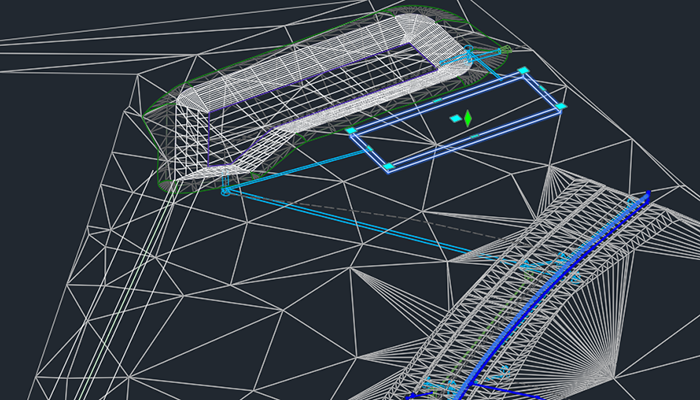
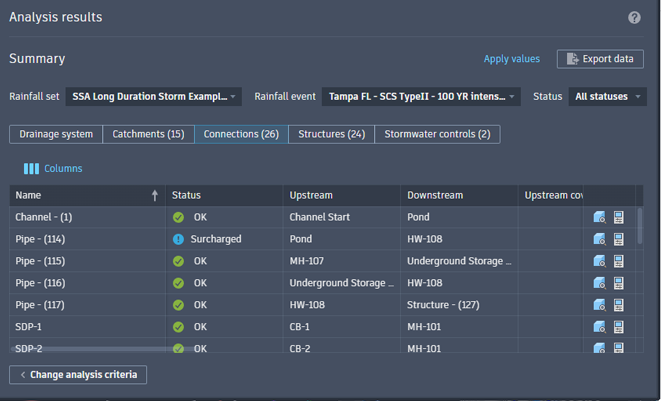
When a drainage engineer prepares to analyze a system, the analysis can be initiated directly within Civil 3D. This allows for the utilization of various rainfall and runoff methods and facilitates the execution of multiple storm event simulations. Upon completion of the analysis, engineers can validate results, including any warnings or errors, before applying them to the drainage components within the drawing and exporting a comprehensive analysis report.
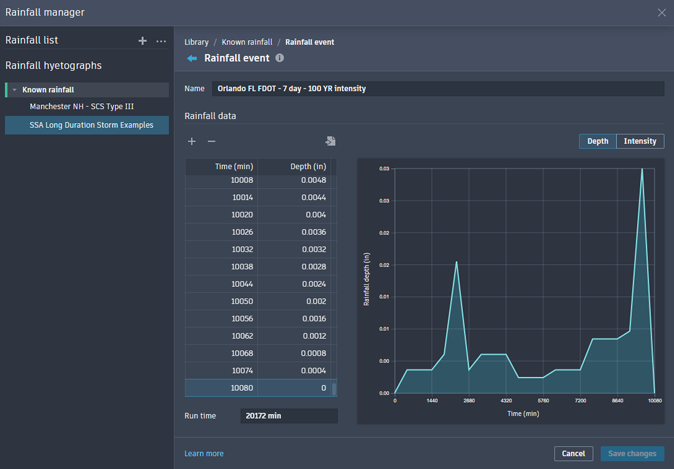
To support the analytical workflows, a rainfall manager for the creation and management of rainfall events is included. Learn more.
New in 2026.2
As mentioned above, Drainage Tools for Civil 3D is now installed with Civil 3D 2026.2. Improvements provided in this update include support for Intensity-Duration-Frequency (IDF) rainfall sets and stormwater object version compatibility across software versions.
General Drainage Tool Enhancements
- All drainage objects within a release (including ponds, underground storage, and channels) now use a unified version for easier management. This object version implementation allows for methods to design a drainage system across teams without updating a drawing to a software release. An object's features are contingent on what version it in which it was created in what version it is open. Objects can be upgraded on command to leverage features in newer versions of Civil 3D. Learn more.
- Civil 3D now displays clear error messages when attempting to create Data References for Pond objects from host drawings created in older versions. This prevents compatibility issues and ensures data integrity when working across different project versions.
- Added a warning if there are mismatched runoff methods when starting Analyze Drainage System. Rational and Modified Rational methods use IDF rainfall data instead of hyetographs and these different types of rainfall data cannot be used together. Rational-based runoff methods cannot be used with other runoff methods in the same analysis.
- Improved the analysis behavior when pipes do not have a Manning's roughness coefficient assigned. A default value of 0.012 is assigned and a warning message displays that this value was used. This improvement provides a non-intrusive validation notification while highlighting the omission and still providing direct access to correctly set the value.
- Added the ability to connect a pipe to a pond or underground storage object during pipe network layout/creation.
- Improved the behavior when connecting a pipe to a stormwater control. Pipes will now connect whenever the end point is within the object boundary.
Catchment Updates
- Added a Catchment Properties button on the catchment contextual ribbon for quick access to object or style properties.
- Updates to the Properties tab of the Catchment Properties dialog box.
Learn more.
- Added the ability to edit flow segment data and to add flow segments of the type required for the catchment area on the Properties tab of the Catchment Properties dialog box. The legacy Flow Segments Vista has been removed from Civil 3D. In-product workflows, such as right-click context menus, have been adjusted accordingly.
- Rational and Modified Rational Methods added on the Runoff tab of the Catchment Properties dialog box. This runoff method calculates peak runoff based on the area of the catchment, the runoff coefficient, and rainfall intensity derived from Intensity-Duration-Frequency (IDF) rainfall data.
- Enabled selection of a Reference Surface on the Properties tab of the Catchment Properties dialog box by adding a dropdown list and button to pick from the drawing. The functionality has been added here to maintain the ability to chose a surface to use for Flow Segment slopes.
- Re-enabled the ability to enter time in different time units to have the User-Defined Time of Concentration value converted to the current display units.
- Added the ability for a catchment discharge to reference a pond or underground storage object instead of just a pipe network structure.
Channel Updates
- Added support for channels in the Model Viewer.
- Added the ability to extract static or dynamic feature lines from channels. Learn more.
- Added Command Settings.
Learn more.
- Channel Baseline settings added for alignment tangent, alignment and feature line curve, and alignment spiral. Default settings are 5.0.
- Channel Cross-section settings added to define the channel cross-section type default. Default setting is Trapezoidal.
- Feature Lines from Channel settings added for the name template and line style for the extracted feature lines.
Pond Updates
- Updates to the Storage tab of the Pond Properties dialog box.
Learn more.
- Added the ability to export storage curve data to a *.csv file.
- Depth increments are now available to define the storage curve for a conceptual pond.
- Improved storage tables of surface generated ponds by allowing deletion of user-defined rows that contain invalid data.
- Added storage calculation options for Surface volume, Conic approximation, or Average end area. Surface generated ponds will always use Surface volume.
- Added a dynamic staged storage curve chart displaying storage area, depth, and volume. Placing a cursor over a depth in the chart will display the appropriate data for that stage.
- Updates to feature and command settings.
- Added feature and command settings
- Added a setting to control the default style for feature lines associated with a pond.
- Added storage settings for freeboard, depth increment, and storage calculation method.
- Added infiltration settings for infiltration type, bottom infiltration rate, side infiltration rate, and safety factor.
- Added a setting to control the default curve radius for pond contours.
- Added Feature Lines from Pond settings for the name template, dynamic linking, and a list of which feature lines to create.
- Added Create Pond settings for pond depth, elevation, elevation reference, and inside slope.
- Added Create Pond from Object settings for pond depth, elevation reference, inside slope, and an option to remove the existing entity.
- The Inflows tab of the Pond Properties dialog box now contains information specific to connections with pipes, channels, and catchments. Learn more.
- Updates to the Outflows tab of the Pond Properties dialog box.
Learn more.
- Organized information specific to connections with pipes and channels.
- 'Base infiltration' has been renamed to 'Bottom infiltration.'
Underground Storage Updates
- Updates to the Storage tab of the Underground Storage Properties dialog box.
Learn more.
- The algorithm for calculating storage area and incremental storage has been revised. Changing any value in one stage of storage does not affect the preceding stage. When modifying the storage area column, the values in other cells within this storage area column remain unchanged.
- Added the ability to export staged underground storage to a *.csv file. The data includes depth, storage area, incremental storage volume, and volume.
- Added a dynamic staged storage curve chart displaying storage area, depth, and volume. Placing a cursor over a depth in the chart will display the appropriate data for that stage.
Rainfall Manager Enhancements
- Intensity-Data-Frequency (IDF) Rainfall Sets added for rainfall data management.
- Import IDF rainfall data from custom, NOAA, SSA, and Hydraflow *.csv files.
- Added the ability to display, hide, zoom, and expand visualization graphs for known rainfall events and IDF rainfall data.
Drainage System Analysis Enhancements
- Analysis criteria is now saved as you work. Prompts to save changes have been removed to expedite workflows.
- Drainage Analysis will now prompt for a valid rainfall dataset before entering the analysis workflow.
- Added inputs and results related to the Rational methods and IDF rainfall to the analysis reporting.
- Changed the method for selecting rainfall for an analysis to use checkboxes on the Analysis Criteria page.
- Added a warning when there are no Catchment inflows when starting drainage system analysis.
- Improvements have been made when exporting analysis results by enabling export when part of the analyzed drainage system has changed. This solution allows exporting the results and analysis criteria, but the input data will remain disabled in order to avoid combining changed input values with previously returned results. The best practice is still to re-run the analysis to be sure the results match the current state of the drainage system.
New in 2026.1
In this update, improvements have been implemented for stormwater controls, the Rainfall Manager, and various user interface enhancements.
General Stormwater Control Enhancements
- Ponds, underground storage objects, and channels can be viewed in Autodesk Construction Cloud.
- Ponds and underground storage can now be added to the Model Viewer.
- In the Prospector, Stormwater Controls have been moved from the Pipe Networks node to their own first level node.
- The LIST command now displays properties for pond and underground storage.
- Ponds and corridors have been added to the Data Shortcuts Editor.
- Drawings containing Pond, Underground Storage, and Channel objects from the tech-preview will open and display correctly in this 2026.1 release. Version compatibility and tracking is maintained.
While analysis functions normally, it is not possible to create or edit drainage design object geometry or properties.
- A warning dialog displays to indicate incompatibility with Civil 3D 2026.1.
- To update these objects to the current version for editing, run DRAINAGEDESIGNUPGRADE from the command line.
Pond Updates
- Ponds can now be shared between drawings using data shortcuts and data references.
- The Storage tab on the Pond Properties dialog box has been redesigned for clarity.
- Ponds can now be created from surfaces. They can also be updated using the Redefine from Surface command.
- Pond now have type classifications. Conceptual ponds are sketched in the drawing. Surface-Based ponds are created from surfaces.
- Four new commands are available for editing pond grading: Quick Edit Pond, Add Side Slope, Add Contour, and Delete Contour.
- You can now adjust slope and volume of a pond from modifying the object in canvas. This includes adding slopes, editing slopes, deleting slope contours, adding contours and editing contour elevations.
- The Add Curves command has been renamed to Fillet Pond.
- The stage storage curve for surface-based ponds can be configured using the "Depth increment" or "User-defined" modes.
- Pond volume calculation has been improved.
- Style selection drop-downs are now available in all pond dialog boxes.
Channel Updates
- Added the CreateChannel command.
- Additional cross section shapes are available for Triangular, Rectangular, and Custom channel sections.
- A custom channel section can be defined manually, by importing points from a CSV file, or by picking a subassembly in the drawing.
- A custom channel section can be defined by importing from an existing Sub-assembly in the drawing.
- The station range for a channel baseline can be customized (Raw Station).
- Alignment and Profile as Channel Baseline support has been implemented for channel creation.
- Channel command and feature settings are now available.
Underground Storage Updates
- You can now select an underground storage and create, copy, and edit its plan view style from the contextual menu.
- Added the ability to display the proportion of empty space (voids) in a stage depth for water storage.
Rainfall Manager Enhancements
- User interface improvements were implemented to easily create, organize, modify, and exchange various rainfall data.
- Added Distribution Based Rainfall in order to create rainfall data based on a rainfall depth applied to a rainfall distribution.
- Added the ability to create a Distribution Based rainfall event based on SCS rainfall distributions and a valid rainfall depth (0 to 10080 mm).
- Added the ability to import and export individual or sets of rainfall data with a Rainfall Library (*.RAIN) file in order to share with other drawings.
Learn more: About the Rainfall Manager
Drainage System Analysis Enhancements
- Added individual and total system outfall details to the Drainage System tab of analysis results.
- Export option enhancements include selection of current result columns, all results columns, or exclusion of results entirely.
- Exporting analysis data now includes rainfall and input data.
- Additional tabs of input data are now included in the analysis exported Excel file. These include SBUH Runoff, Structure, SCS Runoff, SWMM, Analysis Criteria, Stormwater Controls (Ponds and Underground Storage), Connections (pipes and channels), Stormwater Control Outlet, and Time Area Runoff.
- Added support to pass bypass flows from an inlet structure to the downstream target inlet structure.
Learn more: Analyzing Drainage Systems