ICMLive functionality is only available if the ICMLive option is enabled on your licence.
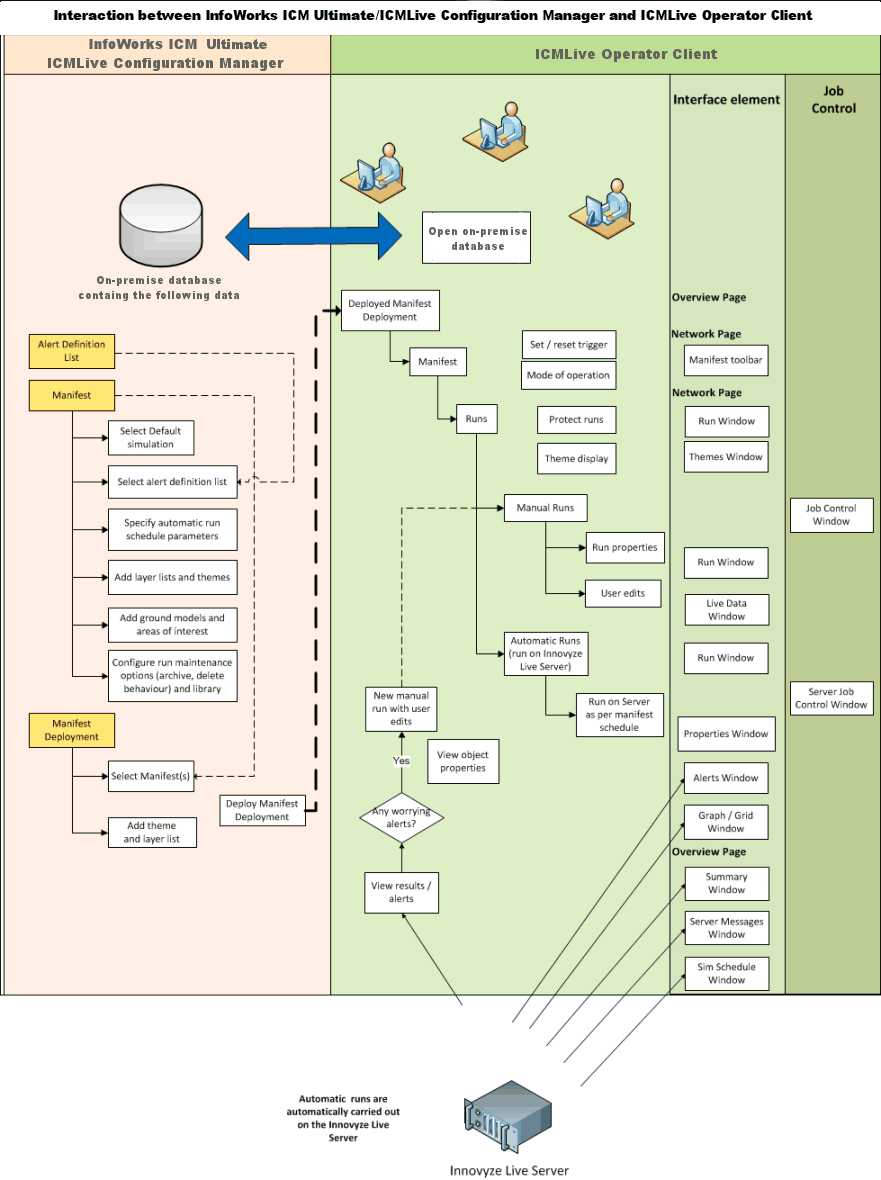
This topic describes how InfoWorks ICM Ultimate and ICMLive Configuration Manager interact with ICMLive Operator Client to provide an effective and reliable ICMLive system.
ICMLive key components
ICMLive is a client/server system, with multi-user architecture. Some of its key features include: multiple user interfaces, flexible data connectivity to allow a wide range of real-time data formats to be utilised, user control over configuration of the entire system from data connection through to the layout of the operational views, ensuring a forecasting system that is easily used by non-technical staff. The key components of an ICMLive system are schematised in the diagram below:
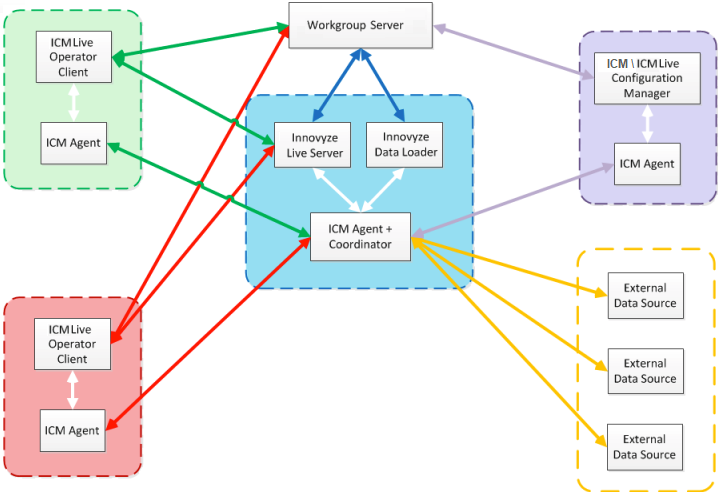
Example of configuration where there are two operators viewing the outputs of the forecasting system
- InfoWorks ICM Ultimate or ICMLive Configuration Manager - used to create, manage and maintain InfoWorks network models in on-premise databases and to convert off-line models into real time forecasting systems. They include tools to configure the live forecasting system.
- ICMLive Operator Client - used to report the forecast results. The interface is designed to be easy to use and to provide clear representations of the forecast information, using a combination of graphical and textual content. The manner in which the contents are presented is entirely user-configurable (within InfoWorks ICM Ultimate and ICMLive Configuration Manager, allowing the important information to be clearly visible to those operating the system). See ICMLive Operator Client help for more information.
- Work Group Data Server - The Workgroup Data Server is a server component which manages access to Workgroup databases. The data server is designed to improve the performance and reliability of database operations in a Workgroup environment.
- ICM Agent (and remote ICM Agents) - The ICM agent acts as a simulation server, scheduling simulations either locally, or on other remote computers by means of the Coordinator.
- Innovyze Live Server - manages automatic simulations (including externally triggered runs), provides real-time services and information to the Live Operator Clients, for example new system alerts, and performs database maintenance, such as purging old simulations.
- Innovyze Data Loader (optional) - manages the automatic loading of telemetry data into a Times Series Data (TSD) object on a scheduled basis or when an external trigger is invoked.
- External Data - such as SCADA/telemetry or RADAR data. TSD objects provide an intermediate store between external data sources and runs in InfoWorks ICM Ultimate and ICMLive Configuration Manager.
ICMLive objects
The following database objects are used by ICMLive:
- Live Group - used to host "live-specific" model objects (specific to ICMLive) but can also contain other database items.
- Action List - composed of a list of actions that are triggered based on the generation of a defined Alert.
- Alert Definition List - composed of alert definitions used to alert the user about interesting occurrences in both the data coming from external sources and the simulation results.
- Manifest - contains a collection of items which will be associated with the InfoWorks network to be simulated in ICMLive Operator Client. Manifests define how simulations are to be run and how they will be displayed in the ICMLive Operator Client (themes, ground models and areas of interested can be selected within the manifest object).
- Manifest Deployment - contains a collection of manifests which will be available for display in ICMLive Operator Client.
ICMLive workflow
InfoWorks ICM Ultimate or ICMLive Configuration Manager is used to create and maintain the underlying data for ICMLive Operator Client. The configuration of the system involves the setting up of alerts, customising the views seen within the operator client (themes, layer lists and ground model that are displayed in ICMLive Operator Client can be defined in ICMLive Configuration Manager or InfoWorks ICM Ultimate) and setting up the scheduling of automatic simulations.
Alerts are the method by which an operator is informed that a certain behaviour has occurred within the network. Alerts can be set on model results, including results taken directly from live data streams.
The creation of views, which will be automatically displayed in ICMLive Operator Client, is carried out using a Manifest. A Manifest allows the user to customise the operator views, including specification of any GIS layers, ground models and thematic views to be displayed.
Manifests are also used to specify the scheduling of automatic simulations, including triggers which will allow a reduction in the period between automatic simulations. This means that more frequent forecasts can be produced during periods of interest.
Some settings can also be set or amended in the ICMLive Operator Client:
- Setting of manual run schedules
- Setting of themes and GIS layers
Automatic runs are run by the Innovyze Live Server. The results of the automatic runs are assessed in ICMLive Operator Client for any alerts. Relevant results are immediately available to the user. Issues can be investigated within the ICMLive Operator Client program, via manual runs, or outside ICMLive.
See Getting Started for more information.